

Imagine an employee receives an email that looks like a normal business request. They click a link, enter their login details, and unknowingly give an attacker access to their account.
The attacker now has a valid username and password. They may even be able to connect through the company’s network.
This is where traditional security approaches can fall short. Being inside an office network or having a valid password should not automatically give someone access to everything.
Zero Trust Security is built around a simple idea: never automatically trust a user, device, or connection. Verify access before allowing it, limit what each account can reach, and continue checking for suspicious activity.
For small and mid-sized businesses (SMBs) in the United States, this approach can help protect company information, employee accounts, cloud applications, customer records, and critical business systems.
The good news is that implementing Zero Trust does not mean replacing your entire IT infrastructure or purchasing an expensive collection of enterprise security products.
In this guide, we’ll explain how Zero Trust works, why it matters, which security controls businesses should prioritize, and how to introduce it step by step.
What’s Your Cybersecurity Risk Score?
Before changing your security architecture, it helps to understand where your business currently stands.
Are employee accounts properly protected? Are your business applications secure? Can your organization identify suspicious access attempts?
Take a few moments to assess your organization’s cybersecurity posture.
Check Your Cybersecurity Risk Score
Identify potential security gaps and understand which areas may deserve attention.
What Is Zero Trust Security?
Zero Trust Security is a cybersecurity approach that removes automatic trust from users, devices, applications, and network connections.
In a traditional network security model, employees who successfully connect to an internal company network may receive access to several internal resources. This can create problems if an account or device is compromised.
Zero Trust changes that approach.
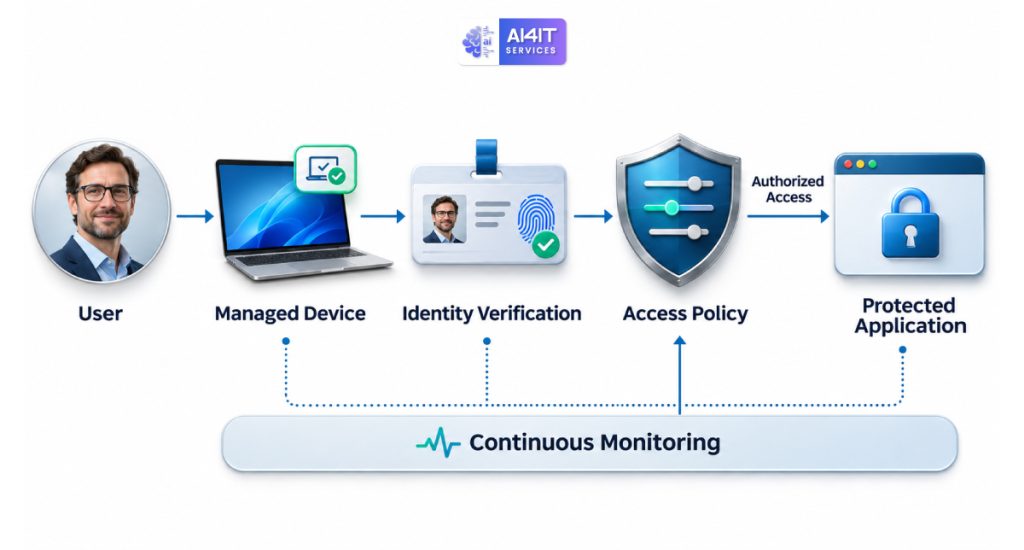
Instead of assuming a user is safe because they are connected to the office network, the system evaluates whether the user and device should be allowed to access a particular resource.
For example, an employee who needs access to the company’s accounting software should not automatically receive access to customer databases, server administration panels, or HR records.
Access should depend on identity, permissions, device security, and the sensitivity of the resource.
The National Institute of Standards and Technology (NIST) describes this approach in its official SP 800-207 Zero Trust Architecture guidance.
The central idea is straightforward:
Never trust access automatically. Verify it, authorize only what is necessary, and reassess when circumstances change.
Why Traditional Security Is No Longer Enough
Many businesses still depend heavily on firewalls, antivirus software, passwords, and office network security.
These technologies remain important, but they do not address every modern cybersecurity risk.
Consider how employees work today:
- They access company applications from home.
- They use cloud platforms such as Microsoft 365 and Google Workspace.
- They connect through personal and company-managed devices.
- They access business systems while travelling.
- They share files with customers, contractors, and suppliers.
- They use third-party applications connected to company accounts.
A traditional network perimeter cannot reliably protect all these activities by itself.
An attacker who steals an employee’s credentials may attempt to access company email, cloud storage, internal applications, and sensitive files.
A Zero Trust approach makes unauthorized access more difficult by introducing additional verification and restricting what an account can do.
How Does Zero Trust Security Work?
Zero Trust is not a single software product. It is a combination of security policies, identity controls, device protection, monitoring, and access management.
Here are six important principles.
1. Verify every user
Every user should prove their identity before accessing protected business resources.
This usually involves:
- Multi-factor authentication (MFA).
- Strong passwords.
- Secure identity management.
- Conditional access policies.
- Additional verification for sensitive operations.
For example, an employee signing in from a recognized company laptop may have a different access experience from someone attempting to connect from an unfamiliar device.
2. Check device security
A valid employee account does not automatically mean the device is safe.
Businesses should consider whether devices accessing company resources:
- Have current operating system updates.
- Use supported endpoint protection.
- Have disk encryption enabled where appropriate.
- Follow company security policies.
- Are protected by screen locks.
- Show signs of compromise.
Where supported, access policies can restrict or block devices that fail important security requirements.
3. Apply least-privilege access
Employees should receive only the permissions needed to perform their jobs.
For example:
| Employee role | Appropriate access |
| Sales employee | CRM and approved sales documents |
| Finance employee | Accounting software and financial records |
| HR employee | HR applications and authorized employee records |
| IT administrator | Specific infrastructure and management systems |
| External contractor | Only the systems and resources required for the contracted work |
An employee should not have administrator privileges simply because it is convenient.
Reducing unnecessary permissions can limit the damage if an account is compromised.
4. Protect applications and company data
Businesses need to control access to individual applications, databases, file-sharing systems, and cloud resources.
Sensitive data should be protected through appropriate access policies, encryption, retention rules, and monitoring.
For example, a marketing employee may need access to campaign files but should not automatically be able to download payroll records.
5. Monitor activity continuously
Access decisions should not depend only on the initial login.
Security systems should monitor unusual activity, such as:
- Multiple failed login attempts.
- Sign-ins from unexpected locations.
- Unusual downloads.
- Access outside normal business patterns.
- Unexpected privilege changes.
- Suspicious application activity.
Depending on the tools and policies in place, these signals can trigger additional verification, alerts, or access restrictions.
6. Assume a breach is possible
Zero Trust does not assume that every attack can be prevented.
It recognizes that attackers may eventually compromise an account, device, or application.
The goal is to make it harder for them to move from one compromised resource to another.
Network segmentation, limited permissions, strong authentication, monitoring, and tested backups all help reduce the potential impact.
Zero Trust vs. Traditional Network Security
Understanding the difference between traditional security and Zero Trust makes it easier to see why businesses are adopting this approach.
| Security area | Traditional approach | Zero Trust approach |
| User authentication | Often focused on initial login | Verifies identity and evaluates access context |
| Network access | Internal network may receive greater trust | Network location does not automatically establish trust |
| Device security | May rely mainly on antivirus and network controls | Device health can influence access decisions |
| Permissions | Users may receive broad access | Least-privilege access is prioritized |
| Monitoring | Often focused on network perimeter activity | Focuses on users, devices, applications, and resources |
| Remote work | Often depends heavily on VPN access | Applies identity and device-based access policies |
| Compromised accounts | May access multiple internal resources | Access can be restricted to approved resources |
| Security strategy | Protects the network boundary | Protects individual resources and access paths |
Zero Trust does not mean removing firewalls or VPNs. These technologies can still play important roles. The difference is that they become part of a broader security strategy rather than the only line of defense.
Why Small and Mid-Sized Businesses Need Zero Trust
Large organizations often have dedicated security teams, identity management platforms, and extensive monitoring systems.
Smaller businesses may have a limited IT team supporting everything from employee laptops to servers, cloud services, email, and backups.
This makes practical security controls especially important.
1. Protect against stolen credentials
Phishing and credential theft can give attackers access to legitimate employee accounts.
MFA and conditional access policies make it harder for stolen passwords alone to provide access.
2. Secure remote and hybrid employees
Employees working from different locations should be able to access approved business systems without receiving unnecessary access to the wider company network.
3. Reduce insider and accidental access risks
Not every security problem comes from an external attacker.
Employees may accidentally share confidential files, download sensitive information, or retain access after changing roles.
Least-privilege permissions help reduce these risks.
4. Protect cloud applications
Businesses increasingly depend on cloud-based email, storage, accounting, collaboration, and customer management systems.
Zero Trust policies can help protect these applications regardless of where employees connect from.
5. Improve business continuity
Limiting access and containing suspicious activity can help prevent one compromised account from becoming a much larger business incident.
This is particularly important for companies that cannot afford prolonged operational disruption.
8 Practical Zero Trust Security Controls Every SMB Should Consider
A small business does not need to implement every advanced security technology immediately.
Start with the controls that address your most important risks.
1. Enable multi-factor authentication
MFA should be enabled for business email, administrator accounts, cloud applications, remote access, and other important services.
Where possible, prioritize phishing-resistant authentication methods such as FIDO2 security keys or passkeys.
Avoid relying on passwords alone for sensitive systems.
2. Use centralized identity management
Managing employee access from a central identity platform makes it easier to control accounts, permissions, authentication, and employee onboarding or offboarding.
Businesses using Microsoft 365 may evaluate Microsoft Entra ID. Organizations using Google Workspace can review Google’s identity and access management capabilities.
Choose solutions based on existing infrastructure and licensing.
3. Manage company devices
Maintain an inventory of laptops, desktops, servers, and mobile devices that access business resources.
Use endpoint management and security tools to maintain updates, enforce security settings, and identify devices that do not meet company requirements.
4. Restrict administrator privileges
Separate everyday employee accounts from administrative accounts.
Use dedicated administrator identities for privileged tasks, limit their permissions, and review access regularly.
This reduces the consequences of a compromised standard employee account.
5. Segment your network
Separate critical business systems from general employee devices and guest networks.
For example:
- Employee workstations.
- Guest Wi-Fi.
- Servers and databases.
- Administrative systems.
- Network management devices.
Use firewall rules and access policies to control communication between these environments.
Network segmentation can help limit lateral movement if an attacker gains access to one device.
6. Monitor login and application activity
Collect relevant authentication and security logs.
Configure alerts for suspicious sign-ins, unusual file activity, privilege changes, and other events that matter to your environment.
For smaller businesses, a managed security provider may help with monitoring and incident escalation.
7. Secure third-party access
External IT support providers, contractors, and software vendors may need access to company systems.
Give each provider an individual account, limit its permissions, require MFA, and review access regularly.
Avoid shared administrator passwords and remove temporary access when it is no longer needed.
8. Maintain secure backups
Zero Trust does not replace backup and recovery planning.
Maintain protected backups of important company information, restrict access to backup systems, and regularly test recovery procedures.
A backup that has never been tested may not be reliable when the business needs it most.

How to Implement Zero Trust in Your Business: A Step-by-Step Plan
One of the biggest mistakes businesses make is trying to implement too many security changes at once.
A phased approach is easier to manage and gives employees time to adapt.
Phase 1: Understand your current environment
Start by identifying:
- Employees and user accounts.
- Company-managed and personal devices.
- Cloud applications and business software.
- Servers and network infrastructure.
- Sensitive company and customer information.
- External vendors and contractors.
- Existing authentication and security controls.
You cannot protect resources effectively if you do not know where they are or who can access them.
Phase 2: Secure employee identities
Begin with your most important accounts.
Enable MFA, remove unused accounts, review administrator permissions, and establish secure onboarding and offboarding procedures.
Prioritize email, cloud administration, financial applications, and remote access.
Phase 3: Improve device security
Make sure company devices receive regular updates and have appropriate endpoint protection.
Establish minimum device security requirements for employees accessing business resources.
Phase 4: Introduce least-privilege access
Review permissions for important applications, shared folders, databases, and administrative systems.
Remove unnecessary access and ensure that sensitive resources are available only to authorized employees.
Phase 5: Improve monitoring and response
Collect authentication and endpoint security logs.
Configure alerts for suspicious behavior and establish a process for investigating and responding to incidents.
Phase 6: Review and improve regularly
Zero Trust is not a one-time installation.
Review access permissions, device compliance, vendor accounts, security alerts, and recovery procedures regularly.
As the business grows, update security policies to reflect new applications, employees, and infrastructure.

Zero Trust Security Tools and Technologies for SMBs
Zero Trust is not a product you can purchase and install in a single step. It requires several technologies working together.
The following are examples of platforms and tools businesses may consider.
| Security requirement | Example technologies | Purpose |
| Identity and access management | Microsoft Entra ID, Google Workspace | Manage identities and access |
| Multi-factor authentication | Microsoft Authenticator, FIDO2 security keys | Add additional login verification |
| Device management | Microsoft Intune | Manage and enforce device security policies |
| Endpoint protection | Microsoft Defender for Business | Protect business endpoints |
| Network security | Business firewalls and network segmentation | Control network traffic |
| Secure remote access | Identity-aware access and ZTNA solutions | Restrict access to approved applications |
| Security monitoring | Microsoft Sentinel and other SIEM platforms | Collect and analyze security events |
| Backup protection | Managed backup and recovery platforms | Protect business information |
These are examples, not a mandatory product list. Some organizations can use capabilities already included in their existing subscriptions, while others may need additional products or managed services.
Before purchasing new software, review what your business already owns and whether its current licensing supports the required security controls.
Is Zero Trust Expensive for Small Businesses?
It does not have to be.
The cost depends on the size of the organization, the number of users and devices, the applications involved, existing licensing, and the complexity of the infrastructure.
A company with 15 employees and a relatively simple cloud environment may be able to introduce important Zero Trust controls using capabilities already available in its business subscriptions.
A company with multiple offices, on-premises servers, external vendors, and complex application access requirements may need a more extensive implementation.
Here is a practical way to prioritize investment:
| Priority | Security improvement | Typical implementation complexity |
| High | Enable MFA | Low |
| High | Remove unused accounts | Low |
| High | Review administrator permissions | Low to medium |
| High | Apply regular security updates | Low to medium |
| High | Secure backups | Low to medium |
| Medium | Centralize identity management | Medium |
| Medium | Device compliance policies | Medium |
| Medium | Network segmentation | Medium |
| Advanced | Identity-aware application access | Medium to high |
| Advanced | Detailed continuous monitoring | Medium to high |
The best starting point is usually not the most expensive technology. It is the security gap that creates the greatest risk for your business.
Common Zero Trust Implementation Mistakes
Zero Trust can improve security, but a poorly planned implementation can create operational problems.
Here are mistakes to avoid.
Treating Zero Trust as a single product: Purchasing a security platform does not automatically make an organization Zero Trust. Policies, identity controls, device security, and monitoring must work together.
Giving everyone administrator access: Broad permissions increase the potential impact of compromised accounts. Apply least privilege wherever practical.
Ignoring employee experience: Excessive authentication prompts and complicated access procedures can frustrate employees. Design policies that balance security with usability.
Forgetting external vendors: Contractors and IT service providers should follow the same access-control principles as internal users.
Failing to monitor activity: Authentication controls are important, but suspicious activity must also be detected and investigated.
Ignoring backups: Strong access controls cannot guarantee that data will never be lost or encrypted by ransomware. Recovery planning remains essential.
Trying to change everything immediately: A phased rollout reduces disruption and allows security policies to be tested before wider deployment.
Zero Trust and Compliance: What U.S. Businesses Should Know
Zero Trust can support an organization’s broader cybersecurity and data-protection program, but implementing it does not automatically make a business compliant with every applicable law or standard.
Depending on the industry and information handled, U.S. organizations may need to consider requirements or frameworks such as:
- HIPAA Security Rule requirements for applicable healthcare organizations.
- The FTC Safeguards Rule for covered financial institutions.
- State privacy and data-protection laws.
- Contractual security obligations from customers and business partners.
- NIST Cybersecurity Framework guidance.
- Industry-specific security requirements.
NIST SP 800-207 provides the architectural foundation for Zero Trust. Its guidance is useful for organizations of different sizes, although the level of implementation should reflect the organization’s environment and risk.
For smaller organizations, NIST also provides practical advice through its Small Business Cybersecurity Resources.
The important point is to use Zero Trust as part of a broader risk-management strategy, not as a substitute for legal, regulatory, or contractual compliance work.
How to Measure Your Zero Trust Security Progress
Once security controls are in place, businesses need a way to measure whether they are working.
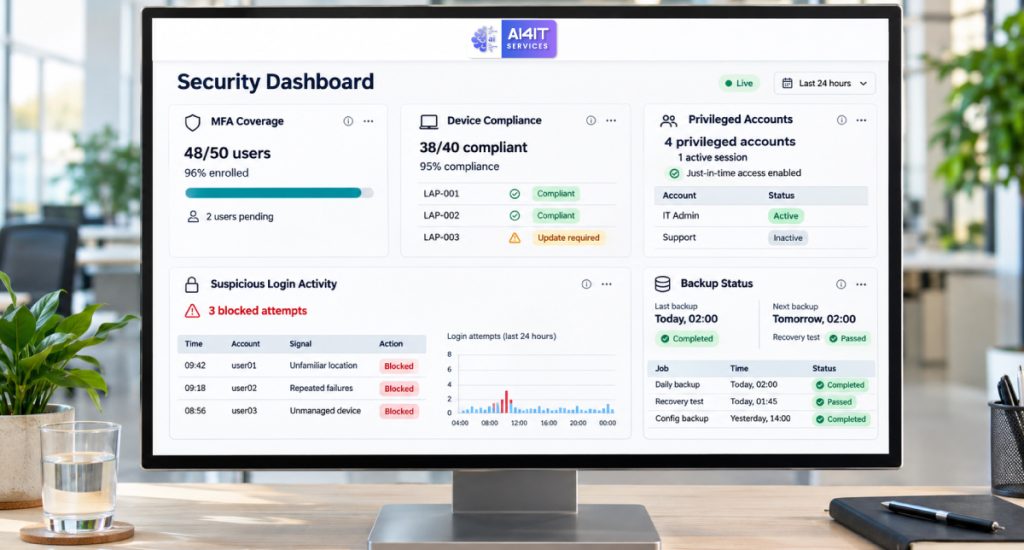
Consider tracking these indicators:
| Security metric | What to measure |
| MFA coverage | Percentage of business accounts protected by MFA |
| Administrator accounts | Number of privileged accounts and their access scope |
| Unused accounts | Accounts that should be disabled or removed |
| Device compliance | Percentage of managed devices meeting security requirements |
| Patch compliance | Devices and systems receiving required updates |
| Access reviews | Percentage of important systems reviewed on schedule |
| Security incidents | Number and severity of suspicious access events |
| Backup recovery | Results of regular backup restoration tests |
| Vendor access | Number of external accounts and their permissions |
These measurements help management understand where security is improving and where additional work may be necessary.
How AI4IT Services Can Help Your Business
Building a stronger security environment starts with understanding your existing infrastructure and identifying where access controls can be improved.
AI4IT Services helps businesses explore practical IT solutions for infrastructure security, web security, hosting environments, and technology management.
For small and mid-sized businesses considering a Zero Trust approach, important areas to review include:
- Server and hosting security.
- Firewall and network protection.
- User access and account security.
- SSL/TLS and secure communications.
- Web application security.
- Security monitoring and maintenance.
- Backup and recovery practices.
- Infrastructure and vulnerability management.
Every organization has different security requirements. A practical assessment can help identify weaknesses, prioritize improvements, and determine which controls make sense for the existing environment.
Visit AI4IT Services to learn more.
What’s Your Cybersecurity Risk Score?
Before investing in new security tools, understand where your organization currently stands.
Take the AI4IT Services Cybersecurity Risk Assessment to get an indication of your business’s cybersecurity risk level and identify areas that may require attention.
Check Your Cybersecurity Risk Score
A better understanding of your risks can help you decide where to focus your security improvements.
Ready to strengthen your business security?
Book a consultation with AI4IT Services to discuss your IT environment, security requirements, and practical next steps.
Frequently Asked Questions

What is Zero Trust Security in simple terms?
Zero Trust means that no user, device, or connection is automatically trusted. Access is verified and restricted according to identity, permissions, device security, and the resource being accessed.
Is Zero Trust suitable for small businesses?
Yes. Small businesses can begin with practical measures such as MFA, restricted administrator access, secure device management, regular updates, and protected backups. Advanced technologies can be introduced as requirements grow.
Does Zero Trust replace firewalls?
No. Firewalls remain important for controlling network traffic. Zero Trust adds identity-based access controls, device verification, least-privilege permissions, and monitoring to create a broader security strategy.
What is the difference between Zero Trust and VPN?
A traditional VPN generally creates an encrypted connection to a private network. Zero Trust Network Access (ZTNA) focuses on granting access to specific applications or resources based on identity and other security conditions. VPNs can still be used where appropriate, but network connectivity alone should not imply broad access.
Does Zero Trust prevent ransomware?
No security model can guarantee complete protection against ransomware. However, MFA, least-privilege access, network segmentation, monitoring, and secure backups can help reduce the opportunities for attackers to spread and limit the impact of an incident.
How long does it take to implement Zero Trust?
The timeline depends on the number of users, devices, applications, existing security controls, and infrastructure complexity. A small organization may begin with foundational improvements relatively quickly, while a more complex environment requires phased planning and testing.
Is Zero Trust expensive?
Not necessarily. Businesses can often begin with existing identity, endpoint, and security capabilities. Additional investment depends on the gaps identified and the level of protection required.
What is the NIST Zero Trust Architecture?
NIST SP 800-207 is an official publication that explains Zero Trust Architecture, its principles, and implementation models. It provides a useful foundation for organizations planning a Zero Trust security strategy.
Where should a business start with Zero Trust?
Start by identifying users, devices, applications, and sensitive data. Then enable MFA, review privileged access, secure company devices, remove unnecessary permissions, and improve security monitoring.
Final Thoughts: Security Should Be Based on Verification, Not Assumptions
Small and mid-sized businesses do not need to wait for a cyberattack before improving their security.
As employees work remotely, applications move to the cloud, and businesses depend on external service providers, traditional network boundaries are becoming less effective on their own.
Zero Trust provides a practical way to approach this challenge. It encourages businesses to verify access, limit permissions, secure devices, monitor activity, and prepare for incidents.
You do not have to implement everything at once. Start with the accounts, applications, and data that matter most to your business. Improve the basics, measure the results, and expand your security controls as your organization grows.
The goal is not to trust nothing blindly. It is to make sure the right people and devices have the right access, at the right time, for the right reasons.
Start by understanding your current security posture.
Check Your Cybersecurity Risk Score and identify opportunities to strengthen your business security.
Visit AI4IT Services or book a consultation to discuss your organization’s IT security needs.