


Many businesses rely on VMware to run their critical applications, databases, virtual servers, and IT infrastructure. It has been a dependable virtualization platform for organizations that need control over their server environments.
However, as infrastructure costs, licensing requirements, hardware refresh cycles, and cloud adoption strategies evolve, businesses are increasingly evaluating whether to continue running VMware on-premises or move their workloads to Microsoft Azure.
Migrating from VMware to Azure can help organizations modernize infrastructure, improve scalability, reduce data center maintenance responsibilities, and adopt cloud-based services. But a successful migration requires more than transferring virtual machines from one platform to another.
Businesses need to understand the financial implications, application dependencies, licensing requirements, security considerations, network architecture, and potential downtime before making the move.
In this guide, we’ll explain how VMware-to-Azure migration works, what it can cost, the risks businesses should consider, and how to build a practical migration strategy in 2026.
What Is VMware to Azure Migration?
VMware-to-Azure migration is the process of moving virtual machines, applications, databases, and supporting infrastructure from an existing VMware environment into Microsoft Azure.
Organizations may choose to migrate for several reasons:
- Reduce dependence on physical data center infrastructure.
- Modernize legacy server environments.
- Improve infrastructure scalability.
- Reduce hardware maintenance requirements.
- Support remote and distributed teams.
- Improve backup and disaster recovery capabilities.
- Consolidate infrastructure management.
- Adopt cloud-native services and automation.
However, migrating to Azure does not always mean moving every VMware virtual machine directly into an Azure virtual machine.
There are different migration approaches, and selecting the right one is one of the most important decisions in the project.
1. Understand Your VMware-to-Azure Migration Options
Before planning costs or migration timelines, businesses should understand the available Azure hosting approaches.
There are three common strategies to evaluate.
Option 1: Migrate VMware VMs to Azure Virtual Machines
<badge color=”success”>Cloud-native infrastructure</badge>
This approach moves workloads from VMware vSphere to native Azure Virtual Machines.
The virtual machines run on Microsoft’s Azure infrastructure rather than on a VMware hypervisor managed by your organization.
This approach is suitable for businesses that want to move away from managing VMware infrastructure and adopt Azure-native services.
Key benefits:
- Reduce on-premises server infrastructure.
- Use Azure compute, storage, and networking.
- Scale resources based on workload requirements.
- Integrate with Azure Backup and Azure Site Recovery.
- Use Azure monitoring and management services.
- Create opportunities to modernize applications over time.
Considerations:
- Some applications may require configuration changes.
- Operating system compatibility must be checked.
- Network architecture may need redesign.
- VMware-specific features may not have direct equivalents.
- Application licensing must be reviewed.
Option 2: Azure VMware Solution (AVS)
VMware-compatible environment
Azure VMware Solution allows organizations to run VMware workloads on VMware infrastructure hosted in Azure.
Instead of immediately converting applications to native Azure virtual machines, businesses can continue using a VMware-based environment in Microsoft’s cloud.
This can be useful when organizations want to move workloads with minimal application changes or need additional time before modernizing their infrastructure.
Key benefits:
- Continue using familiar VMware technologies.
- Reduce the need for immediate application refactoring.
- Support VMware-based operational processes.
- Move certain workloads with fewer infrastructure changes.
- Establish a cloud-based VMware environment.
Considerations:
- Azure VMware Solution has a different cost structure from ordinary Azure VMs.
- VMware licensing requirements must be verified.
- Host capacity and storage planning are important.
- Networking and connectivity require careful design.
- Businesses still need a plan for backup, security, and operational management.
Option 3: Modernize Applications During Migration
<badge color=”discovery”>Application modernization</badge>
Instead of moving every virtual machine as it currently exists, businesses can use migration as an opportunity to modernize applications.
For example:
- Move suitable web applications to Azure App Service.
- Migrate supported databases to Azure SQL.
- Use Azure Kubernetes Service for suitable containerized workloads.
- Replace selected file services with managed cloud storage.
- Use Azure Functions for suitable event-driven workloads.
This approach may reduce infrastructure management responsibilities over time, but it generally requires more application assessment, development work, and testing.
Comparing the Three Migration Approaches
| Feature | Azure Virtual Machines | Azure VMware Solution | Application modernization |
| VMware dependency | Removed for migrated workloads | VMware environment retained | Depends on final architecture |
| Application changes | May be required | Usually fewer initially | Often significant |
| Infrastructure management | Azure-native VM management | VMware and Azure operations | More managed services |
| Migration complexity | Moderate | Moderate to high | Often high |
| Modernization opportunity | High | More limited initially | High |
| Suitable for | General server workloads | VMware-dependent applications | Applications suitable for redesign |
Important: Azure Virtual Machines and Azure VMware Solution are different services. A migration assessment should identify which workloads belong in each destination rather than assuming one approach is appropriate for everything.
2. Why Are Businesses Considering VMware to Azure Migration in 2026?
Several business and technology factors are influencing infrastructure decisions.
Changing VMware licensing and subscription requirements
Broadcom’s acquisition of VMware brought changes to VMware’s product packaging, licensing, and subscription model.
Organizations should review their current VMware agreements, renewal dates, subscription terms, product entitlements, and future costs before deciding whether to renew, remain on-premises, or migrate.
For businesses considering Azure VMware Solution, VMware licensing requirements also need special attention. Microsoft published guidance explaining the portable VMware Cloud Foundation subscription requirements announced for hyperscaler deployments beginning November 1, 2025.
This means businesses should not assume that an existing VMware license automatically covers a new cloud deployment.
Data center infrastructure costs
Running an on-premises VMware environment involves ongoing expenses such as:
- Physical server hardware
- Storage infrastructure
- Network equipment
- Power and cooling
- Data center space
- Hardware maintenance
- VMware licensing
- Backup infrastructure
- IT administration
Moving workloads to Azure can reduce some infrastructure responsibilities, but it introduces cloud consumption costs.
The financial benefit depends on workload utilization, migration scope, licensing, and long-term resource management.
Business scalability
Traditional data center environments require capacity planning and hardware procurement.
Cloud infrastructure allows organizations to provision resources more flexibly. This can help businesses respond to changing workloads without purchasing physical hardware for every capacity increase.
Business continuity and disaster recovery
Azure provides services that can support backup, recovery, replication, and business continuity planning.
However, these capabilities need to be designed, configured, tested, and monitored. Moving workloads to Azure does not automatically create a complete disaster recovery strategy.
3. VMware to Azure Migration Costs: What Should Businesses Budget For?
Cost is one of the most important factors when evaluating a migration project.
Some businesses assume that moving from VMware to Azure will automatically reduce infrastructure expenses. That is not always true.
A poorly sized Azure environment can become more expensive than the original infrastructure.
The total migration cost should be divided into two categories:
- One-time migration costs
- Ongoing Azure operating costs
A. One-Time Migration Costs
| Cost category | Description |
| Infrastructure assessment | Inventory, workload discovery, dependency mapping |
| Migration planning | Architecture design, target sizing, migration strategy |
| Migration services | Technical execution and workload transfer |
| Network configuration | VPN, ExpressRoute, DNS, routing, and firewall changes |
| Application testing | Compatibility, performance, and functional testing |
| Security configuration | Identity, access, policies, and monitoring |
| Staff training | Preparing IT teams for Azure operations |
| Documentation | Updating infrastructure and recovery documentation |
The cost of each category depends on the number of virtual machines, application complexity, migration approach, and internal IT capabilities.
B. Ongoing Azure Operating Costs
After migration, businesses need to budget for the resources that support their workloads.
| Azure cost component | What affects the cost |
| Compute | VM size, processor, memory, and running hours |
| Storage | Disk type, capacity, performance, and redundancy |
| Networking | Data transfer, connectivity, and network services |
| Backup | Protected instances, storage, and retention |
| Disaster recovery | Replication and recovery infrastructure |
| Monitoring | Log ingestion, retention, and monitoring services |
| Security | Security tools and selected protection services |
| Licensing | Windows Server, SQL Server, and other software entitlements |
| Support | Azure support arrangements and operational services |
The exact cost depends on the Azure region, configuration, agreement, licensing eligibility, usage patterns, and selected services.
C. Example: Understanding Azure VM Costs
Consider a business that currently operates 20 VMware virtual machines.
Instead of assigning every workload a large Azure VM, the company assesses actual CPU and memory utilization and identifies opportunities to right-size the destination environment.
An illustrative planning scenario might look like this:
| Metric | Example |
| Existing VMware virtual machines | 20 |
| Average allocated memory per VM | 16 GB |
| Average allocated virtual CPUs per VM | 4 |
| Total allocated memory | 320 GB |
| Total allocated virtual CPUs | 80 |
| Migration target | Azure Virtual Machines |
| Cost optimization approach | Right-sizing and usage monitoring |
These are hypothetical infrastructure figures, not an Azure price quotation.
The final Azure configuration may differ considerably from the existing VMware allocation because provisioned resources and actual consumption are not necessarily the same.
D. How to Estimate Azure Migration Costs
Microsoft Azure Migrate helps businesses discover, assess, and plan migrations.
Its assessment capabilities can estimate recommended Azure VM sizes and associated hosting costs.
When preparing an assessment, consider:
- Azure region
- Recommended VM size
- Operating system licensing
- Azure Hybrid Benefit eligibility
- VM uptime
- Storage configuration
- Reserved Instances or Savings Plans
- Network and data transfer requirements
- Backup and disaster recovery requirements
Microsoft provides Azure Migrate assessment tools at no additional charge for its supported assessment and migration capabilities, although third-party tools and related Azure resources may incur costs.
Useful tools:
E. How to Reduce Azure Migration Costs
Businesses can improve cost efficiency through several practical measures.
1. Right-size virtual machines
Avoid copying the existing VMware CPU and memory allocation without reviewing actual utilization.
2. Use appropriate purchasing options
Evaluate pay-as-you-go pricing, reservations, and Azure Savings Plans for eligible workloads with predictable usage.
3. Review Azure Hybrid Benefit
Eligible organizations may be able to use qualifying existing Windows Server and SQL Server licenses to reduce Azure costs.
Eligibility depends on the licensing agreement and applicable requirements.
4. Shut down non-production workloads
Development, testing, and staging environments may not need to operate continuously.
5. Review storage requirements
Select storage tiers based on performance, availability, and access requirements rather than using premium storage everywhere.
6. Monitor cloud consumption
Use Microsoft Cost Management to track spending, identify unexpected usage, and review resource allocation.
7. Retire unnecessary servers
Migration is an opportunity to identify unused virtual machines, redundant services, and applications that are no longer required.

4. VMware to Azure Migration Risks Businesses Should Understand
Moving virtual machines to Azure can improve infrastructure flexibility, but migration introduces technical and operational risks.
Identifying these risks early can help prevent unexpected downtime, performance problems, and additional expenses.
Risk 1: Application Compatibility
Some applications depend on VMware-specific features, configurations, or hardware behavior.
Applications may also rely on older operating systems, custom drivers, specialized licensing, or unsupported software.
How to reduce the risk:
- Inventory all applications.
- Check operating system support.
- Identify VMware-specific dependencies.
- Review application vendor requirements.
- Test workloads in a non-production environment.
Risk 2: Network Configuration Problems
On-premises VMware environments may use specific VLANs, IP ranges, DNS configurations, routing policies, and firewall rules.
Moving workloads to Azure may require changes to these configurations.
Common issues include:
- Incorrect IP address assignments
- DNS resolution failures
- Firewall restrictions
- VPN connectivity problems
- Routing conflicts
- Unexpected network latency
How to reduce the risk:
Create a detailed network migration plan that documents subnets, IP addresses, DNS, routing, firewall rules, and application communication requirements.
Risk 3: Application Dependencies
Applications rarely operate independently.
A business application may depend on a database server, authentication service, file server, DNS server, or another internal application.
If dependent systems are migrated separately without proper planning, applications may stop functioning.
How to reduce the risk:
Use dependency discovery and application mapping to identify which workloads need to move together.
Group related virtual machines into migration waves based on their dependencies.
Risk 4: Performance Issues After Migration
A virtual machine that performs well on-premises may not behave the same way in Azure.
Performance can be affected by:
- CPU and memory sizing
- Disk throughput and IOPS
- Storage latency
- Network bandwidth
- Application architecture
- Workload usage patterns
How to reduce the risk:
Capture performance baselines before migration and compare them with Azure performance after cutover.
Test critical applications under realistic workloads before approving production migration.
Risk 5: Data Loss and Downtime
Migration involves copying data and transferring workloads between environments.
If replication is incomplete or cutover is poorly coordinated, businesses may experience downtime or data inconsistencies.
How to reduce the risk:
- Maintain verified backups.
- Use replication where supported.
- Perform test migrations.
- Schedule cutovers during approved maintenance windows.
- Define rollback criteria.
- Validate application data after migration.
Risk 6: Security and Compliance Gaps
Moving infrastructure to Azure changes how access, identities, network controls, logging, and data protection are managed.
A migration that does not include security planning can create new vulnerabilities.
How to reduce the risk:
- Review identity and access policies.
- Enable multi-factor authentication.
- Apply least-privilege permissions.
- Configure network security groups.
- Review encryption requirements.
- Enable monitoring and logging.
- Assess relevant compliance obligations.
Risk 7: Unexpected Cloud Spending
Cloud resources can continue generating costs even when applications are not being actively used.
Oversized VMs, unnecessary storage, excessive logging, and unused resources can increase monthly spending.
How to reduce the risk:
Set budgets, configure cost alerts, monitor usage, review recommendations, and assign clear ownership for Azure resources.
Migration Risk Summary
| Risk | Business impact | Recommended action |
| Application incompatibility | Application failure | Compatibility assessment |
| Network misconfiguration | Connectivity disruption | Network design and testing |
| Missing dependencies | Service interruption | Dependency mapping |
| Poor resource sizing | Performance issues | Right-sizing and benchmarking |
| Data replication problems | Data loss or inconsistency | Backup and test migration |
| Security gaps | Increased exposure | Security baseline and validation |
| Cloud overspending | Higher operating costs | Cost monitoring and optimization |
5. How to Plan a Successful VMware to Azure Migration
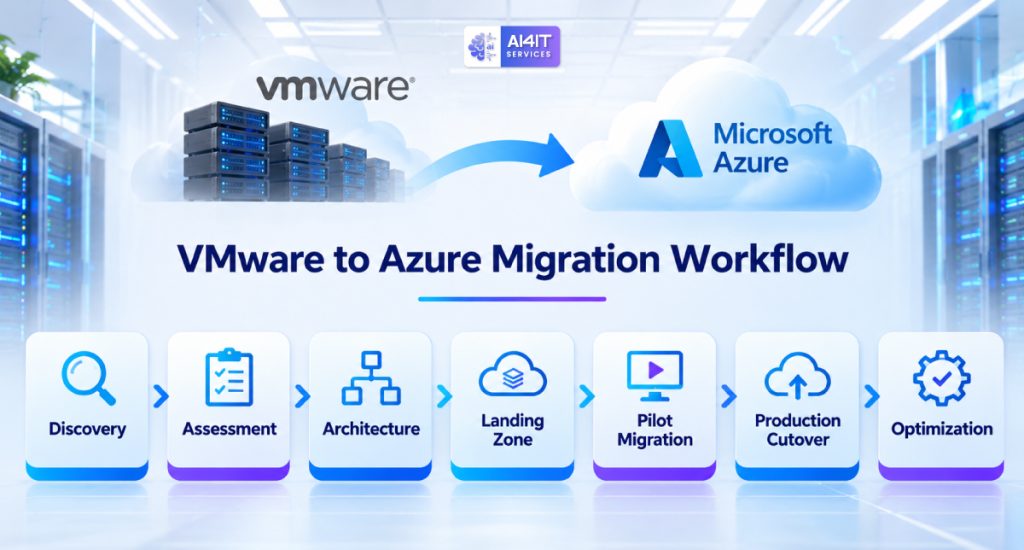
A successful migration starts with discovery and planning, not with moving virtual machines.
Businesses should establish clear objectives, understand their existing environment, select the appropriate Azure destination, and prepare a migration roadmap.
Step 1: Discover Your Existing VMware Environment
Start by building an inventory of your VMware infrastructure.
Collect information about:
- ESXi hosts
- vCenter servers
- VMware clusters
- Virtual machines
- Operating systems
- CPU and memory utilization
- Storage capacity
- Network configuration
- Application dependencies
- Backup arrangements
- Existing licensing
Tools such as RVTools and Azure Migrate can help collect and analyze infrastructure information.
The purpose is to understand what you currently operate before deciding what should move.
Step 2: Assess Workload Readiness
Not every virtual machine should automatically move to Azure.
Classify workloads based on:
- Business importance
- Technical compatibility
- Performance requirements
- Security requirements
- Application dependencies
- Licensing restrictions
- Migration complexity
A useful classification is:
| Classification | Description | Recommended action |
| Ready to migrate | Supported and relatively straightforward | Plan migration |
| Requires remediation | Needs configuration or compatibility changes | Fix before migration |
| Modernization candidate | Better suited to a managed Azure service | Evaluate modernization |
| Retain on-premises | Has specific technical or business restrictions | Review later |
| Retire | No longer required | Decommission safely |
This avoids spending money migrating workloads that are no longer needed.
Step 3: Select the Right Azure Architecture
Choose the appropriate target for each workload.
For example:
- General Windows and Linux servers may move to Azure Virtual Machines.
- VMware-dependent workloads may be evaluated for Azure VMware Solution.
- Suitable databases may move to Azure SQL.
- Suitable web applications may move to Azure App Service.
- File and object storage workloads may use appropriate Azure storage services.
The target architecture should consider performance, security, cost, operational complexity, and long-term business requirements.
Step 4: Build an Azure Landing Zone
Before migrating production workloads, prepare the Azure environment.
An Azure landing zone provides a structured foundation for deploying and managing workloads.
It may include:
- Azure subscriptions
- Management groups
- Resource organization
- Virtual networks and subnets
- Identity and access management
- Network security
- Policy and governance
- Monitoring and logging
- Backup and recovery configuration
A properly designed landing zone helps establish consistent governance and security before workloads are introduced.
Step 5: Plan Migration Waves
Avoid moving every virtual machine at once.
Group workloads into manageable migration waves.
For example:
| Migration wave | Workload type | Priority |
| Wave 1 | Development and testing servers | Low |
| Wave 2 | Internal applications | Medium |
| Wave 3 | File and business support services | Medium |
| Wave 4 | Production application servers | High |
| Wave 5 | Critical databases and business systems | Very high |
The actual order should depend on application dependencies, business impact, technical readiness, and the organization’s ability to validate each wave.
Step 6: Test Before Production Migration
Testing is essential.
Azure Migrate supports test migration workflows that allow organizations to validate replicated workloads in an isolated environment before production cutover.
Test:
- VM startup and operating system behavior
- Application functionality
- Database connectivity
- Network communication
- DNS resolution
- Authentication
- Storage performance
- Security policies
- Backup configuration
Document the results and obtain approval before proceeding.
Step 7: Execute Production Cutover
Once testing is complete:
- Confirm the migration window.
- Notify affected business teams.
- Verify backup availability.
- Confirm replication health.
- Stop or control application writes where required.
- Perform the planned final synchronization.
- Start the Azure workload.
- Validate application and network functionality.
- Confirm user access.
- Obtain business acceptance.
Maintain a documented rollback strategy before beginning production cutover.
Step 8: Optimize and Decommission
After successful migration:
- Review VM sizing.
- Monitor CPU and memory utilization.
- Optimize storage.
- Review cloud costs.
- Configure backup and disaster recovery.
- Validate monitoring and security.
- Update infrastructure documentation.
- Remove temporary migration resources.
- Decommission VMware infrastructure only after formal approval and dependency checks.
6. Azure Migrate: A Tool for VMware Migration Planning
Microsoft Azure Migrate is designed to help organizations discover, assess, and migrate workloads to Azure.
It provides a centralized approach for understanding existing infrastructure and planning migration activities.
What Azure Migrate Can Help With
Discovery
Collect information about existing servers and infrastructure.
Dependency analysis
Identify communication relationships between workloads to help plan migration groups.
Assessment
Evaluate Azure readiness and estimate suitable target configurations.
Cost estimation
Estimate Azure hosting costs using selected sizing, region, licensing, and pricing assumptions.
Migration
Use supported migration workflows to replicate and move VMware virtual machines to Azure.
Agent-Based vs. Agentless Migration
Azure Migrate supports different VMware migration methods.
| Feature | Agentless migration | Agent-based migration |
| Architecture | Uses an appliance-based approach | Uses replication agents and appliances |
| Source VM changes | Depends on supported configuration | Requires agent deployment |
| Planning | Requires compatibility and appliance checks | Requires agent and replication planning |
| Suitability | Suitable for supported VMware environments | Useful for supported scenarios requiring agent-based replication |
| Operational considerations | Appliance capacity and network access | Agent deployment, maintenance, and replication |
The correct method depends on operating system support, infrastructure configuration, migration scale, and technical requirements.
Always review Microsoft’s current support matrix and prerequisites before selecting a method.
Useful resources:
7. VMware Licensing and Azure Hybrid Benefit: What Businesses Should Review
Licensing is one of the areas businesses should evaluate carefully before migrating.
Moving a virtual machine to Azure does not automatically transfer every software entitlement or remove existing licensing obligations.
VMware Licensing
Organizations should review:
- Existing VMware product subscriptions
- Contract renewal dates
- License portability
- VMware Cloud Foundation entitlements
- Azure VMware Solution requirements
- Licensing for retained on-premises systems
For Azure VMware Solution, Microsoft has published guidance about the VMware Cloud Foundation portable subscription requirements introduced under Broadcom’s updated licensing approach.
Confirm current requirements with Microsoft and Broadcom before committing to an AVS architecture.
Windows Server and SQL Server Licensing
Azure Hybrid Benefit may allow eligible customers to apply qualifying existing Windows Server or SQL Server licenses to supported Azure deployments.
However, eligibility depends on the licensing program, Software Assurance or subscription requirements, product edition, and applicable terms.
Before migration, verify:
- Which licenses are eligible?
- Are the licenses currently assigned elsewhere?
- Does the intended Azure deployment qualify?
- Are the applicable Software Assurance requirements satisfied?
- Are any license mobility or reassignment restrictions relevant?
A licensing review can prevent unexpected costs and compliance issues.
8. Security and Compliance After Migration
Moving VMware workloads to Azure changes the infrastructure management model, but it does not remove the organization’s responsibility for security.
Businesses should establish security controls before and after migration.
Important Azure Security Considerations
Identity and access management
Use Microsoft Entra ID, MFA, role-based access control, and least-privilege permissions.
Network security
Use network security groups, firewalls, private connectivity, and segmentation to control traffic.
Data protection
Review encryption, access controls, backup policies, and data retention.
Endpoint and server security
Maintain endpoint protection, vulnerability management, and operating system updates.
Monitoring and logging
Configure appropriate monitoring and retain security logs for investigation.
Backup and recovery
Use an appropriate backup architecture and regularly test restoration.
Compliance
Evaluate applicable requirements based on industry, customer agreements, data type, and business location.
For example, organizations handling regulated healthcare information should review their HIPAA obligations and the applicable Azure service agreements and configurations. Cloud migration alone does not establish compliance.
9. VMware to Azure Migration Timeline: How Long Does It Take?
Migration duration depends on the size and complexity of the environment.
A business with a small number of independent virtual machines may complete its migration more quickly than an organization with hundreds of servers and interconnected applications.
The following is an illustrative planning timeline.
| Phase | Example duration | Main activities |
| Discovery and assessment | 1–2 weeks | Inventory and dependency analysis |
| Architecture and planning | 1–3 weeks | Target design, cost assessment, landing zone |
| Pilot migration | 1–2 weeks | Test migration and validation |
| Migration waves | 2–8+ weeks | Production workload migration |
| Optimization | 1–3 weeks | Cost, performance, and security improvements |
Actual durations may be longer depending on application complexity, data volume, compliance requirements, network capacity, and change-management processes.
The most important objective is not to migrate as quickly as possible. It is to migrate with acceptable risk and a verified recovery path.
10. Common VMware to Azure Migration Mistakes
Businesses can avoid unnecessary cost and disruption by addressing common planning mistakes.
Mistake 1: Migrating Every VM Without Assessment
Some virtual machines may be unused, duplicated, or no longer needed.
Better approach: Inventory and classify workloads before migration.
Mistake 2: Copying Existing VM Sizes Directly
VMware resource allocations may not reflect actual usage.
Better approach: Review performance metrics and right-size Azure resources.
Mistake 3: Ignoring Application Dependencies
Moving related services separately can disrupt business applications.
Better approach: Use dependency mapping and migration waves.
Mistake 4: Overlooking Licensing
Existing software licenses may have restrictions or specific Azure eligibility requirements.
Better approach: Complete a licensing review before estimating final costs.
Mistake 5: Skipping Test Migration
An apparently successful replication does not guarantee that the application will work correctly after cutover.
Better approach: Test application behavior, network connectivity, performance, and recovery.
Mistake 6: Forgetting Post-Migration Costs
Azure spending can increase when resources are not monitored.
Better approach: Establish budgets, alerts, cost ownership, and regular optimization reviews.
Mistake 7: Decommissioning VMware Too Early
Some systems may still depend on the original environment.
Better approach: Maintain the source environment until migration validation, business acceptance, and rollback requirements are satisfied.
11. Should Your Business Move From VMware to Azure?
There is no single answer for every organization.
Your decision should depend on the current VMware environment, licensing position, hardware lifecycle, application requirements, operational costs, and long-term IT strategy.
Azure Migration May Be Suitable If:
- Your organization is planning a data center exit.
- Hardware requires replacement.
- VMware licensing costs have changed significantly.
- You want to reduce on-premises infrastructure responsibilities.
- Your applications are compatible with Azure.
- You want to adopt cloud-native services.
- Your business needs flexible infrastructure capacity.
Remaining on VMware May Be Appropriate If:
- Your infrastructure has significant hardware investment remaining.
- Applications have strict virtualization dependencies.
- Existing VMware costs remain commercially acceptable.
- Your environment requires specialized hardware or low-latency local processing.
- Cloud migration does not provide a clear business advantage.
Consider Azure VMware Solution If:
- You need to retain VMware-based applications.
- You want to move away from your physical data center.
- Application refactoring is not currently practical.
- You need a transition path before modernizing workloads.
The best migration strategy may combine these approaches. Some workloads may move to Azure VMs, others may use Azure VMware Solution, and some may remain on-premises.
12. A Practical VMware-to-Azure Migration Checklist
Use this checklist before approving a migration project.
Infrastructure discovery
- Inventory all VMware hosts and virtual machines.
- Document CPU, memory, storage, and network utilization.
- Identify unused and redundant virtual machines.
- Map application and server dependencies.
Cost and licensing
- Review VMware licensing and renewal terms.
- Estimate Azure compute and storage costs.
- Evaluate Azure Hybrid Benefit eligibility.
- Estimate backup, network, monitoring, and support expenses.
- Establish a cloud cost monitoring plan.
Architecture and security
- Select the appropriate Azure destination.
- Design the Azure landing zone.
- Review identity and access controls.
- Plan networking, DNS, and firewall configuration.
- Define backup and disaster recovery requirements.
Migration execution
- Select a migration method.
- Complete a pilot migration.
- Test application compatibility.
- Validate network connectivity and performance.
- Define cutover and rollback procedures.
- Obtain business approval for production migration.
Post-migration
- Monitor application performance.
- Review Azure costs.
- Verify backup and recovery.
- Update infrastructure documentation.
- Decommission source infrastructure only after approval.
Frequently Asked Questions (FAQs)
1. Can VMware virtual machines be migrated directly to Azure?
Yes. Supported VMware virtual machines can be migrated to Azure using Azure Migrate and other supported migration methods. The process involves discovery, assessment, replication, testing, and cutover.
2. What is the difference between Azure VM and Azure VMware Solution?
Azure Virtual Machines run on Microsoft’s native Azure infrastructure. Azure VMware Solution provides a VMware environment hosted in Azure, allowing organizations to continue using VMware technologies for supported workloads.
3. How much does VMware-to-Azure migration cost?
Costs depend on the number of virtual machines, migration complexity, Azure resource sizing, storage, networking, licensing, backup, and ongoing management. Businesses should complete an assessment and use the Azure Pricing Calculator before approving a budget.
4. Is Azure Migrate free?
Microsoft lists its Azure Migrate assessment and migration capabilities as available at no additional charge for supported scenarios. Third-party tools, Azure resources, and related services may incur separate charges.
5. How long does VMware-to-Azure migration take?
A small environment may take several weeks, while a large or complex environment may require several months. The timeline depends on workload dependencies, data volume, application testing, licensing, and migration requirements.
6. Will migrating VMware to Azure cause downtime?
Some migration methods allow replication and testing before production cutover, which can reduce downtime. However, downtime may still be required during final synchronization, network changes, and application validation.
7. Can businesses reduce Azure costs after migration?
Yes. Right-sizing VMs, selecting appropriate storage, using eligible licensing benefits, reviewing reservations and Savings Plans, shutting down unused resources, and monitoring consumption can help manage costs.
8. Do existing VMware licenses work with Azure VMware Solution?
Businesses should not assume that existing VMware licenses automatically cover Azure VMware Solution. Review current Broadcom licensing terms and Microsoft’s Azure VMware Solution requirements before planning deployment.
9. Can businesses migrate VMware workloads without changing applications?
Azure VMware Solution can provide a VMware-compatible environment for supported workloads with fewer application changes. Migrating to native Azure services may require application or infrastructure modifications.
10. What should businesses do before migrating VMware workloads?
Start with infrastructure discovery, application dependency mapping, licensing review, Azure cost estimation, target architecture design, security planning, and a pilot migration.
Final Thoughts: Plan Your VMware to Azure Migration Before Moving Workloads
Migrating from VMware to Azure can be an important step toward modernizing business infrastructure, reducing data center responsibilities, and improving technology flexibility.
However, moving virtual machines without understanding costs, application dependencies, licensing, and recovery requirements can create unnecessary expenses and operational disruption.
A successful migration starts with a clear understanding of the existing environment and a practical plan for the destination.
For businesses evaluating VMware-to-Azure migration in 2026, the most important steps are:
- Assess the existing VMware infrastructure.
- Identify workloads that are suitable for Azure.
- Compare Azure Virtual Machines and Azure VMware Solution.
- Review VMware and Microsoft licensing requirements.
- Estimate migration and ongoing operating costs.
- Plan networking, security, and application dependencies.
- Test workloads before production cutover.
- Optimize resources after migration.
Need help planning your VMware-to-Azure migration?
AI4IT Services helps businesses evaluate IT infrastructure, cloud migration requirements, server environments, and cybersecurity considerations.
Whether you are planning a data center migration, evaluating Azure infrastructure, or looking to optimize your existing IT environment, a structured assessment can help you understand the technical requirements and potential costs.
Book a consultation with AI4IT Services:
https://go.appointmentcore.com/book/yYDD8Arcz?cid=is:~Contact.Id~
Website: https://www.ai4itservices.com/