
Does your company really have true safety in Microsoft 365? Many teams think signing up for the platform locks everything down tight, yet reality gives a different picture.
Could it be that your setup only uses part of what the system offers, letting risks slip through unnoticed?
Use Multi-Factor Authentication Before Anything Else
The one most important thing you can do to secure Microsoft 365 accounts is to enable multi-factor authentication (MFA). Microsoft has reported that it has been able to block more than 99% of account compromise attacks using MFA. It’s essential, or even a weak password might be insufficient if it can be stolen via phishing or if it is compromised in a data leak; a bad password is a bad password.
Set up MFA for all users, even non-admin users. Do not use SMS codes and use the Microsoft Authenticator app instead, as SMS can be compromised in a SIM-swapping attack. Companies that take MFA seriously tend to use it in conjunction with Conditional Access (CA) for smarter risk-based enforcement, which we will discuss next. Before implementing MFA organization-wide, take the time to do a proper cybersecurity risk assessment to determine your level of security.
Use the right approach to set up Conditional Access Policies
Conditional Access maintains rules based on user, device, location, and risk rather than granting access to everyone, from anywhere. All businesses should have the following four types of policies set up:
Block Legacy Authentication Protocols
MFA is not supported by the old protocols such as POP3 and SMTP. These are points that attackers actively attack. The first step is to disable legacy authentication.
Require Compliant Devices
Only allow access to devices enrolled and compliant in Microsoft Intune. This prevents unauthorized or personal devices from being able to see corporate data.
Implement Sign-In Risk Rules
Automatically block and/or challenge access to risky logins, such as logins from unknown locations or anonymous IPs, with Microsoft Entra ID Protection.
Implement Role-Based Access Controls
Restrict access of individual users to the extent of their specific job. Admins should always log in to the server using a privileged account, not using their “everyday” account. When organizations have either a hybrid or a cloud environment, Conditional Access is much more effective when those policies are integrated with a larger Zero Trust security framework.
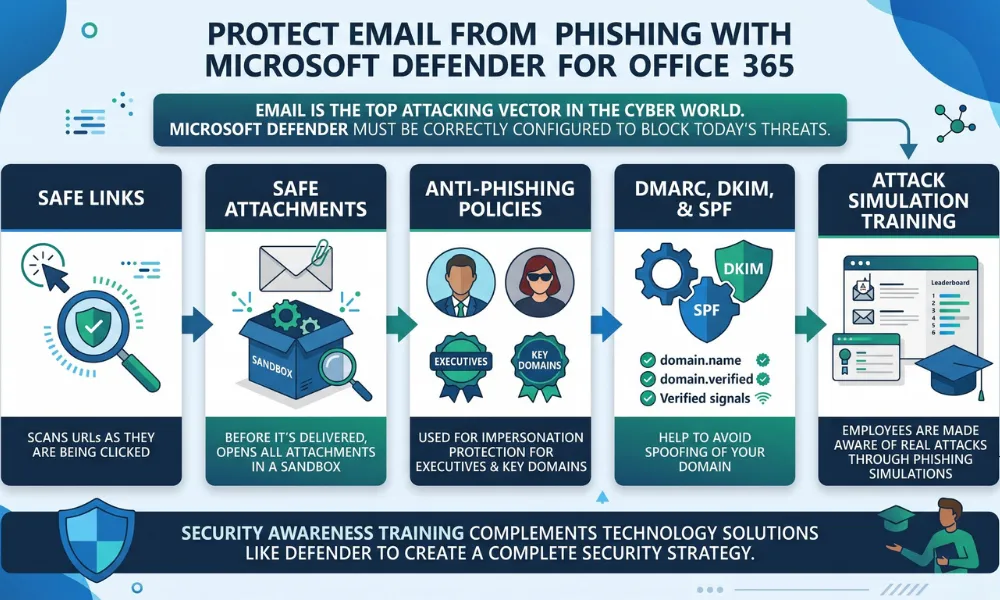
Protect Email from Phishing with Microsoft Defender for Office 365
Email is the top attacking link in the cyber world. Microsoft Defender for Office 365 must be correctly configured to block today’s threats:
- Safe Links scans URLs as they are being clicked.
- Before it’s delivered, Safe Attachments will open all attachments in a sandbox.
- Anti-Phishing Policies can be used for impersonation protection for executives and key domains.
- DMARC, DKIM, and SPF help to avoid spoofing of your domain.
- Employees can be made aware of real attacks through Attack Simulation Training’s phishing simulations.
Security awareness training complements technology solutions like Defender to create a complete security strategy.
Implement a Zero Trust Model for Microsoft 365
The idea of Zero Trust is never trust, always verify. This is equivalent to verifying identities before each access request, applying least privilege permissions, assuming that every access is a breach, restricting lateral movement, and continuously monitoring all access with Microsoft Sentinel or Defender XDR in the Microsoft 365 environment.
Just because they have the license does not mean that they are secure. For businesses with more complex environments, it may be useful to have services that specialize in cloud security audits, in addition to Microsoft’s tools.
Protect Data using DLP and Sensitivity Labels
Microsoft Purview offers two important tools for the protection of Office 365 data:
Data Loss Prevention (DLP): automatically prevents data sharing of sensitive data, such as credit card numbers, healthcare data, and SSNs, through email, Teams, SharePoint, and OneDrive.
Classify documents as Confidential, Internal, or Public, and automatically encrypt. Once downloaded, the file is protected, along with the protection itself. These capabilities help with IT compliance and governance, and prevent the penalties that can be costly.
Re-check Your Security Configuration from time to time
Once it’s set, it’s forgotten, and it slowly fades away. Get a continually updated, actionable view of your configuration with Microsoft Secure Score. Turn on Unified Audit Logging so that it can log all user and admin activity. Regularly audit Admin roles to delete permissions no longer required (quarterly).
Managed cyber security services deliver continuous monitoring and threat response throughout your Microsoft 365 environment, giving businesses the monitoring and threat response that they can’t afford to miss around the clock without having an in-house team.