

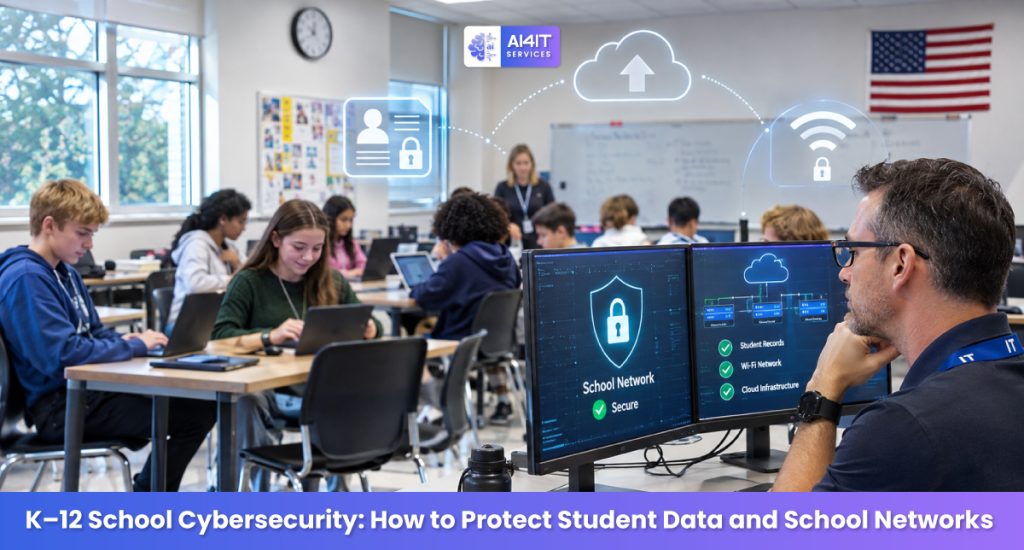
Schools today depend on technology for almost every aspect of education. Students use laptops and tablets for classroom activities, teachers rely on digital learning platforms, and administrators manage attendance, grades, student records, communication, and school operations through connected systems.
These technologies make education more accessible and efficient. However, they also create cybersecurity challenges for schools and school districts.
A ransomware attack can disrupt classroom instruction. A compromised school account can expose student information. An unsecured learning application can create privacy risks. Even a simple phishing email can provide attackers with access to important school systems.
For K–12 schools in the United States, cybersecurity is no longer just an IT department responsibility. It is an important part of student privacy, school safety, educational continuity, and institutional trust.
In 2026, schools need a practical cybersecurity strategy that protects student data, secures school networks, manages connected devices, and prepares staff to respond to cyber incidents.
This guide explains the biggest cybersecurity threats facing K–12 schools and provides actionable steps school administrators, IT teams, and district leaders can take to strengthen their security.
What Is K–12 School Cybersecurity?
K–12 school cybersecurity refers to the technologies, policies, and procedures used to protect school networks, student information, educational applications, devices, and digital infrastructure from cyber threats.
K–12 schools manage significant amounts of sensitive information, including:
- Student names, addresses, and contact details
- Parent and guardian information
- Attendance and academic records
- Grades and assessment results
- Special education records
- Student health information maintained by schools
- Teacher and employee information
- Financial and administrative records
- Login credentials and account information
This information must be handled carefully and protected from unauthorized access, disclosure, alteration, or loss.
A complete school cybersecurity program should protect three important areas:
- Confidentiality: Ensure that sensitive student and school information is accessible only to authorized individuals.
- Integrity: Prevent unauthorized changes to grades, attendance records, student information, and school data.
- Availability: Keep essential school systems accessible to students, teachers, and administrators when needed.
The objective is to create a secure digital learning environment without unnecessarily disrupting teaching and school operations.
Why K–12 Schools Need Stronger Cybersecurity in 2026
Schools are attractive targets for cybercriminals because they manage sensitive information, support large numbers of users, and depend on technology for daily operations.
Unlike many businesses, school districts must support students, teachers, administrators, parents, contractors, and external service providers across multiple locations.
This creates a complex technology environment.
1. Schools Manage Sensitive Student Information
Student records can contain personally identifiable information (PII), academic histories, health-related information, and family details.
If this information is exposed, students and families may face privacy violations, identity theft, fraud, or other harm.
2. Ransomware Can Interrupt Classroom Learning
A ransomware incident can make student information systems, learning platforms, file servers, and administrative applications unavailable.
Schools may struggle to manage attendance, communicate with families, access lesson materials, or continue normal operations.
3. More Connected Devices Mean More Security Responsibilities
School environments may contain:
- Student Chromebooks and laptops
- Teacher computers
- Classroom tablets
- Smartboards and interactive displays
- Wireless access points
- Network printers
- Security cameras
- Administrative servers
- Internet-connected classroom devices
Each connected device needs appropriate security, maintenance, and access controls.
4. Limited IT Resources Create Challenges
Many school districts operate with limited IT budgets and small technology teams.
A small team may be responsible for hundreds or thousands of devices, network infrastructure, user accounts, classroom applications, backups, and technical support.
Without clear priorities, important security tasks can be delayed.
5. Third-Party Educational Technology Creates Additional Risk
Schools use external applications for learning management, online assessments, communication, attendance, student information management, and classroom collaboration.
These providers may collect or process student information. Schools need to understand what information is collected, how it is protected, and who can access it.
The U.S. Department of Education’s K–12 cybersecurity guidance emphasizes practical measures such as software updates, MFA, strong passwords, phishing awareness, and collaboration with cybersecurity organizations. <FileCite ref_id=”turn505144search2″ />
1. Understand the Biggest Cybersecurity Threats Facing K–12 Schools
Understanding common attack methods helps school administrators prioritize security investments.
Threat 1: Ransomware Attacks
Ransomware is malicious software that can encrypt files, disrupt access to systems, and interfere with school operations.
Attackers may also steal student or employee information and threaten to publish it.
A ransomware incident may affect:
- Student information systems
- Learning management platforms
- School email
- File servers
- Financial systems
- Attendance applications
- Administrative databases
- Network infrastructure
How schools can reduce the risk:
- Maintain secure and tested backups.
- Enable MFA for important accounts.
- Apply security updates regularly.
- Segment school networks.
- Monitor suspicious activity.
- Restrict administrator privileges.
- Maintain an incident response plan.
Threat 2: Phishing and Social Engineering
Phishing emails often imitate trusted people or organizations.
A teacher may receive an email that appears to come from the school principal. An administrator may receive a fake Microsoft 365 password notification. A finance employee may receive a fraudulent invoice request.
If an employee clicks a malicious link or enters credentials into a fake login page, attackers may gain access to school accounts.
How schools can reduce the risk:
- Provide regular staff cybersecurity training.
- Use email filtering and anti-phishing protection.
- Enable MFA.
- Establish a simple process for reporting suspicious emails.
- Verify unexpected financial and account-related requests.
Threat 3: Compromised Student and Teacher Accounts
Students and teachers frequently access digital platforms from school, home, and mobile devices.
Weak passwords, password reuse, and compromised accounts can expose sensitive information.
How schools can reduce the risk:
- Use unique accounts for each user.
- Encourage long, unique passwords.
- Enable MFA for staff and privileged accounts.
- Apply age-appropriate authentication controls for students.
- Review inactive accounts.
- Remove access when students or employees leave the district.
Threat 4: Unsecured School Wi-Fi Networks
School networks support many different users and devices.
If guest Wi-Fi, student devices, administrative systems, and critical infrastructure are not properly separated, a compromised device may create opportunities for unauthorized network access.
How schools can reduce the risk:
- Separate guest, student, staff, and administrative networks.
- Use secure wireless authentication.
- Change default equipment credentials.
- Restrict access to network management interfaces.
- Monitor unusual network traffic.
- Regularly update wireless access points and routers.
Threat 5: Unsecured Educational Applications
Teachers and students may use online applications for assignments, collaboration, assessments, and communication.
Some applications may request access to student names, email addresses, files, location information, or other personal data.
Unapproved applications can create privacy and security risks.
How schools can reduce the risk:
- Maintain an approved educational application list.
- Review privacy policies and data collection practices.
- Check vendor security controls.
- Limit unnecessary permissions.
- Establish a process for reviewing new applications.
- Remove applications that are no longer needed.
Threat 6: Insider Threats and Accidental Data Exposure
Security incidents can also result from mistakes made by authorized users.
Examples include:
- Sending student records to the wrong recipient.
- Sharing files with unauthorized people.
- Leaving a classroom computer unlocked.
- Using personal email to transfer school documents.
- Sharing login credentials.
- Downloading sensitive information onto unmanaged devices.
How schools can reduce the risk:
Use role-based access, employee training, secure file-sharing tools, audit logs, and clear data-handling policies.

2. Protect Student Data and School Records
Student information is among the most important assets a school manages.
A school may maintain student records across student information systems (SIS), learning management systems (LMS), cloud storage, administrative databases, and third-party applications.
Protecting this information requires more than a strong password policy.
Essential Student Data Protection Measures
Role-based access control
Give users access only to the information required for their responsibilities.
For example:
- Teachers should access the student information needed for their classes.
- Administrators should have access based on their job responsibilities.
- Finance employees should have appropriate access to financial records.
- Students should access only their own authorized learning accounts and resources.
Multi-factor authentication
Use MFA for staff accounts, administrators, cloud platforms, remote access, and other sensitive systems.
Encryption
Use appropriate encryption to protect sensitive data during transmission and, where supported, at rest.
Secure file sharing
Use approved school platforms to share student records rather than personal email accounts or unapproved file-sharing services.
Audit logging
Maintain logs that help identify who accessed sensitive records and when.
Data retention and deletion
Establish policies for retaining and securely disposing of student information according to applicable legal and district requirements.
Regular access reviews
Review user permissions, inactive accounts, and external access regularly.
3. Understand FERPA, COPPA, and Student Privacy Responsibilities
K–12 schools in the United States need to consider student privacy requirements when collecting, using, storing, and sharing information.
Two important federal laws are the Family Educational Rights and Privacy Act (FERPA) and the Children’s Online Privacy Protection Act (COPPA).
Other federal and state requirements may also apply depending on the school, its activities, the information involved, and the services it uses.
What Is FERPA?
The Family Educational Rights and Privacy Act (FERPA) is a federal law that protects the privacy of student education records.
FERPA generally applies to educational agencies and institutions that receive funds under applicable programs administered by the U.S. Department of Education.
It establishes rights relating to access to and disclosure of education records and personally identifiable information from those records.
For schools, this means student information must be handled according to applicable FERPA requirements and permitted exceptions.
The Department of Education notes that FERPA does not itself prescribe a specific set of cybersecurity controls. However, schools should take appropriate steps to safeguard student records because security incidents can create privacy risks and potential FERPA violations. <Cite refs={[“turn505144search1″,”turn505144search10”]}/>
What Is COPPA?
The Children’s Online Privacy Protection Act (COPPA) regulates certain online services that collect personal information from children under 13.
The FTC’s COPPA Rule applies to covered operators of websites and online services directed to children under 13, as well as certain general-audience services with actual knowledge that they collect personal information from children under 13.
The rule includes requirements relating to parental notice and consent, data collection, security, retention, and deletion.
Schools may authorize certain collection of children’s personal information on behalf of parents in limited educational contexts, but this does not give vendors unrestricted permission to use student information for unrelated purposes.
The FTC’s amended COPPA Rule became effective June 23, 2025, with a general compliance deadline of April 22, 2026, subject to specified exceptions. <Cite refs={[“turn505144search37”]}/>
FERPA vs. COPPA
| Area | FERPA | COPPA |
| Primary focus | Privacy of education records | Online collection of personal information from children under 13 |
| Main audience | Covered educational institutions and relevant education records | Covered online service operators |
| Key concern | Access to and disclosure of student education records | Collection, use, and disclosure of children’s personal information |
| School responsibility | Protect education records and follow disclosure requirements | Evaluate educational technology use and applicable school authorization conditions |
| Vendor consideration | School control and permitted use of education records | Appropriate notices, consent, security, and data practices |
Important: FERPA and COPPA have different scopes. Not every student information system or educational application is subject to both laws in the same way. Schools should consult qualified privacy and legal professionals when evaluating specific applications and data-sharing arrangements.
4. Secure School Networks and Wi-Fi Infrastructure
School networks connect students, teachers, administrators, classroom technology, and external services.
A poorly configured network can expose sensitive systems to unnecessary risk.
Why Network Segmentation Matters
Network segmentation separates school systems into controlled network zones.
A school district may create separate network environments for:
- Student devices
- Teacher workstations
- Administrative systems
- School servers
- Guest Wi-Fi
- Security cameras
- Network management
- Backup infrastructure
This helps limit unnecessary communication between systems.
For example, a student device should not have unrestricted access to administrative servers or network management interfaces.
School Network Security Checklist
| Security area | Recommended action |
| Wi-Fi security | Use strong authentication and secure encryption |
| Network segmentation | Separate student, staff, guest, and administrative systems |
| Firewall | Restrict unnecessary inbound and outbound traffic |
| Router security | Change default credentials and update firmware |
| DNS protection | Consider protective DNS filtering |
| Network monitoring | Review unusual traffic and suspicious connections |
| Remote access | Secure VPN and administrative connections |
| Documentation | Maintain updated network diagrams and device inventories |
Schools should periodically review network configurations as new devices, buildings, and educational applications are introduced.
5. Protect Student Chromebooks, Laptops, Tablets, and Classroom Devices
Schools often manage large numbers of student and staff devices.
These may include Chromebooks, Windows laptops, Mac computers, tablets, interactive displays, and other classroom technology.
Without proper device management, lost, stolen, or compromised devices can create security and privacy risks.
Essential School Device Security Practices
Centralized device management
Use appropriate mobile device management (MDM) or endpoint management tools to configure and monitor school-owned devices.
Automatic updates
Enable operating system and application updates wherever possible.
Endpoint protection
Deploy appropriate endpoint security tools based on device type and operating system.
Screen locks
Configure automatic screen locking and secure authentication.
Device encryption
Enable supported encryption for devices that store sensitive information.
Remote management
Maintain the ability to locate, lock, or wipe eligible school-managed devices when necessary.
Application control
Restrict unapproved software installations and unnecessary permissions.
Asset tracking
Maintain an inventory that records device ownership, assignment, location, and lifecycle status.
What About Lost or Stolen School Devices?
Schools should have a clear procedure for reporting lost devices.
The response should include:
- Notify the school’s IT or security team.
- Identify the device and its assigned user.
- Determine whether sensitive information may be stored locally.
- Revoke relevant sessions or access where necessary.
- Lock or remotely wipe the device when appropriate.
- Assess whether the incident creates a privacy or reporting obligation.
- Document the incident and corrective action.

6. Strengthen School Email and Account Security
Email is one of the most common entry points for cyberattacks.
School staff may receive messages involving parents, students, suppliers, district administrators, and educational service providers.
Attackers may exploit these trusted relationships to steal credentials or persuade employees to transfer money or disclose sensitive information.
Important Email Security Measures
Enable multi-factor authentication
Require MFA for staff email accounts, administrators, and other important services.
Configure email authentication
Use SPF, DKIM, and DMARC appropriately to help protect the school’s email domain against spoofing and improve email authentication.
Use phishing protection
Deploy email filtering and security tools to identify suspicious links, attachments, and impersonation attempts.
Train school employees
Teach staff to verify unusual requests and report suspicious messages.
Protect administrative accounts
Use dedicated privileged accounts and stronger authentication for employees managing school infrastructure.
Monitor account activity
Review unusual sign-ins, suspicious forwarding rules, unexpected password changes, and other account anomalies.
7. Protect Learning Management Systems and Educational Applications
Digital learning platforms are essential to modern classrooms.
Schools may use systems for:
- Online assignments
- Classroom collaboration
- Digital assessments
- Student communication
- Video lessons
- Attendance
- Grade management
- Educational content
These applications can process significant amounts of student information.
Before approving a new application, schools should evaluate its security and privacy practices.
Educational Application Security Checklist
| Review area | Questions to ask |
| Data collection | What student information does the application collect? |
| Data usage | Why is the information collected and how is it used? |
| Access control | Can administrators manage permissions? |
| Encryption | Is information protected during transmission and storage? |
| Vendor security | Does the provider maintain appropriate security practices? |
| Data retention | How long is student information retained? |
| Data deletion | Can data be securely deleted when no longer required? |
| Third parties | Does the provider share information with subcontractors? |
| Incident response | How does the provider notify schools about security incidents? |
| Compliance | What contractual and legal obligations apply? |
The Department of Education advises teachers to check with school or district administration before introducing online applications that collect student information. Under the FERPA school official exception, qualifying service providers must meet specific conditions, including direct school control over the use and maintenance of education-record information and restrictions on unauthorized use and redisclosure.
8. Prepare for Ransomware and School Network Disruptions
Ransomware can affect school operations at several levels.
A school may lose access to attendance records, digital assignments, staff email, financial systems, and student information.
Even if classroom devices remain operational, the loss of central services can interrupt teaching and administrative work.
Build a 3-2-1 Backup Strategy
The 3-2-1 backup approach provides a practical foundation:
- Keep three copies of important data.
- Use two different storage types where practical.
- Store at least one copy off-site.
For stronger ransomware resilience, schools should consider immutable or offline backup copies.
Protect School Backups
- Use separate backup administrator accounts.
- Enable MFA for backup management.
- Restrict deletion permissions.
- Separate backup infrastructure from production networks.
- Monitor backup jobs and unusual activity.
- Test restoration regularly.
- Maintain documented recovery procedures.
Identify Critical School Systems
| School system | Importance | Recovery priority |
| Student information system | Critical | Very high |
| Learning management system | Critical | Very high |
| School email and communication | High | High |
| Attendance system | High | High |
| Financial and payroll systems | High | High |
| General file storage | Varies | Based on business impact |
| Guest Wi-Fi | Lower | Lower |
Each school district should determine its recovery priorities through a business impact analysis involving school leadership, IT, and relevant operational teams.
9. Create a School Cybersecurity Incident Response Plan
A cybersecurity incident can affect more than computers and servers.
Schools need a coordinated response that involves IT teams, administrators, teachers, district leadership, communication staff, and relevant external partners.
What Should a School Incident Response Plan Include?
1. Incident reporting
Define how employees, students, and parents report suspected cybersecurity incidents.
2. Identification
Establish who evaluates security alerts and determines the scope of an incident.
3. Containment
Document how compromised devices and accounts are isolated or disabled.
4. Investigation
Identify affected systems, student records, accounts, and potential data exposure.
5. Communication
Establish communication responsibilities for staff, families, district leadership, vendors, and relevant authorities.
6. Recovery
Restore clean systems, validate security, and gradually return services to normal operation.
7. Documentation
Maintain records of the incident, actions taken, and improvements identified.
School Business Continuity Planning
Schools should also prepare for temporary technology outages.
Continuity procedures may include:
- Alternative attendance recording
- Offline lesson materials
- Backup communication methods
- Manual administrative procedures
- Alternative student information access arrangements
- Emergency contact lists
- Temporary classroom technology arrangements
The objective is to keep essential educational services running while IT teams investigate and restore affected systems.

10. Train Teachers, Staff, Students, and Parents
Technology controls are important, but cybersecurity awareness also plays a major role in protecting schools.
Teachers, administrators, students, and parents interact with digital systems in different ways. Each group should understand the security practices relevant to its responsibilities.
Teacher and Staff Training
Train school employees to:
- Recognize phishing emails.
- Protect login credentials.
- Use MFA.
- Handle student information securely.
- Avoid unauthorized applications.
- Secure school devices.
- Report suspicious activity.
- Verify unexpected financial requests.
- Follow approved file-sharing procedures.
Student Cybersecurity Education
Age-appropriate student education can cover:
- Creating strong passwords.
- Recognizing suspicious links.
- Protecting personal information.
- Understanding safe online behavior.
- Reporting cyberbullying and suspicious activity.
- Avoiding unknown downloads.
- Using approved school applications.
Parent Awareness
Schools can help families understand:
- How student accounts are protected.
- Which digital applications are approved.
- How to report suspicious communications.
- How to protect school-issued devices at home.
- How to recognize fraudulent school-related messages.
Cybersecurity education should be ongoing rather than limited to a single annual presentation.
11. Manage Third-Party Vendors and School Technology Providers
K–12 schools rely on external organizations for technology and educational services.
These may include:
- Student information system providers
- Learning management platforms
- Cloud hosting companies
- IT support providers
- Managed service providers
- Online assessment platforms
- Communication applications
- Educational content providers
A security issue involving one of these vendors can affect school systems and student information.
Vendor Security Assessment Checklist
Before approving a provider, consider reviewing:
- What student information does the vendor access?
- Where is the information stored?
- How is sensitive information protected?
- Does the provider use MFA and access controls?
- Does the vendor have an incident response plan?
- How quickly will the school be notified of a security incident?
- How long is student information retained?
- Can data be securely deleted when services end?
- Are subcontractors involved?
- What contractual privacy and security commitments apply?
Schools should also establish clear processes for granting, monitoring, and removing vendor access.
12. Build a Practical K–12 Cybersecurity Improvement Plan
Schools do not need to implement every security improvement at once.
A phased approach helps districts focus on important protections while managing limited budgets and IT resources.
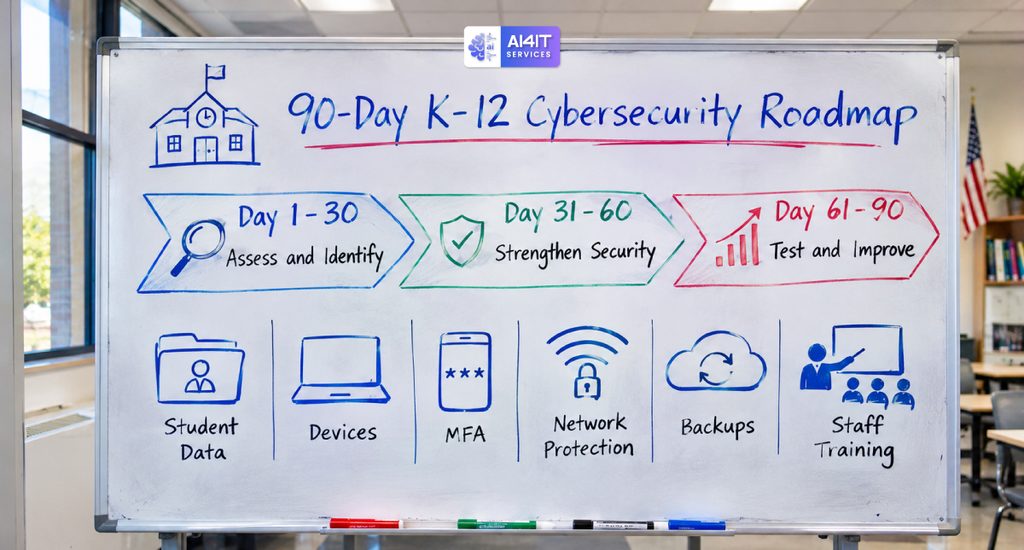
Days 1–30: Assess and Identify
- Inventory school devices, servers, and network equipment.
- Identify systems containing student information.
- Review staff and administrator accounts.
- Assess MFA coverage.
- Review existing backup arrangements.
- Identify unsupported software and devices.
- Review approved educational applications.
- Identify external vendor access.
Days 31–60: Strengthen Security
- Enable MFA for critical accounts.
- Improve email and phishing protection.
- Apply missing security updates.
- Review network segmentation.
- Restrict administrator permissions.
- Strengthen backup security.
- Review vendor privacy and security practices.
- Provide staff cybersecurity awareness training.
Days 61–90: Test and Improve
- Test backup restoration.
- Conduct a ransomware tabletop exercise.
- Review incident reporting procedures.
- Test student and staff account recovery.
- Validate network security configurations.
- Review access permissions.
- Update security documentation.
- Create a longer-term cybersecurity improvement roadmap.
At the end of 90 days, district leadership should have a clearer understanding of the school’s cybersecurity posture and the next investments needed.
13. How Managed IT Services Can Help Schools Improve Cybersecurity
Many K–12 schools and districts have limited internal IT resources.
A small technology team may need to manage hundreds or thousands of devices, network infrastructure, cloud platforms, user accounts, classroom technology, and support requests.
This can make it difficult to maintain consistent cybersecurity controls.
A managed IT services provider can help schools support their infrastructure and technology operations, depending on the agreed service scope.
Managed IT Services for Schools May Include
- Network monitoring and administration
- Firewall management
- Server administration
- Endpoint security management
- Device management
- Patch management
- Cloud infrastructure support
- Backup monitoring
- Disaster recovery planning
- IT help desk support
- Network troubleshooting
- IT documentation and reporting
Some organizations may also need specialist services such as managed detection and response (MDR), penetration testing, or dedicated incident response support.
These services should be evaluated separately rather than assumed to be included in every managed IT agreement.
Questions School Administrators Should Ask an IT Provider
Before choosing a managed IT provider, consider asking:
- Do you have experience supporting K–12 schools or school districts?
- Can you manage large numbers of student and staff devices?
- How do you protect student information?
- Do you provide network and endpoint monitoring?
- How do you manage security updates?
- Can you help with backup and disaster recovery?
- How do you handle ransomware incidents?
- Can you support school network segmentation?
- How do you manage third-party access?
- What support and response times are included in the agreement?
A reliable provider should explain its responsibilities, security capabilities, service levels, and limitations clearly.
14. Free and Official Cybersecurity Resources for K–12 Schools
School districts do not have to develop their cybersecurity programs from scratch.
Several U.S. government and education-focused organizations provide useful resources.
CISA K–12 Cybersecurity Foundations Resource Package
In August 2026, CISA released its K–12 Cybersecurity Foundations Resource Package to help schools and districts develop and improve their cybersecurity programs.
The package includes guides, implementation materials, videos, and supplemental resources covering eight objectives:
- Protecting login credentials
- Safeguarding devices and assets
- Testing backups
- Strengthening incident response
- Improving cybersecurity training
- Managing sensitive data
- Aligning investments with recognized cybersecurity frameworks
- Developing long-term cybersecurity plans
This is a useful starting point for schools with limited internal cybersecurity expertise.
U.S. Department of Education K–12 Cybersecurity Guidance
The Department of Education provides practical guidance for schools and districts, including recommendations for patching, MFA, strong passwords, phishing awareness, and collaboration with cybersecurity organizations.
Additional Resources
Schools should also explore state education agency resources and applicable regional cybersecurity support programs.
15. K–12 School Cybersecurity Checklist
Use this checklist to review your school’s current security practices.
Student data protection
- Identify where student information is stored.
- Apply appropriate access controls.
- Review student data-sharing practices.
- Maintain approved educational application lists.
- Review vendor privacy policies and agreements.
Account security
- Enable MFA for critical staff and administrator accounts.
- Use unique user accounts.
- Review privileged access.
- Disable inactive accounts.
- Establish secure password practices.
Network and device security
- Separate student, staff, and guest networks.
- Update routers, firewalls, and access points.
- Maintain a device inventory.
- Enable supported device encryption.
- Apply security updates.
- Monitor unusual network activity.
Backup and recovery
- Maintain multiple backup copies.
- Protect backups from unauthorized deletion.
- Test restoration procedures.
- Document recovery priorities.
- Maintain a ransomware response plan.
People and processes
- Train teachers and staff.
- Provide age-appropriate student cybersecurity education.
- Establish an incident reporting process.
- Review vendor access.
- Conduct periodic cybersecurity risk assessments.
Frequently Asked Questions (FAQs)
1. Why is cybersecurity important for K–12 schools?
Schools store sensitive student and employee information and rely on technology for teaching, administration, and communication. Cybersecurity helps protect student privacy, maintain system availability, reduce operational disruption, and support safe digital learning.
2. What are the biggest cybersecurity threats facing schools?
Common threats include ransomware, phishing, compromised accounts, malware, unsecured Wi-Fi, vulnerable classroom devices, insider mistakes, and third-party security incidents.
3. What is FERPA, and why does it matter for school cybersecurity?
FERPA is a federal law that protects the privacy of student education records at covered educational institutions. Schools must follow applicable requirements when accessing, using, and disclosing protected student information.
4. Does FERPA require schools to use specific cybersecurity software?
No. FERPA does not prescribe a particular set of cybersecurity tools or technical controls. However, schools should take appropriate steps to safeguard education records and manage risks to student privacy.
5. How can schools protect student data?
Schools can use role-based access control, MFA, encryption, secure file sharing, audit logging, staff training, approved educational applications, and regular access reviews.
6. How can schools prevent ransomware attacks?
Schools should use MFA, patch management, endpoint protection, email security, network segmentation, secure backups, employee awareness training, and incident response planning.
7. Should students and teachers use the same school Wi-Fi network?
Not necessarily. Separating student, teacher, administrative, guest, and critical infrastructure networks can reduce unnecessary access and limit the impact of a compromised device.
8. How often should schools test backups?
Testing frequency should reflect the importance of the systems and the district’s recovery requirements. Schools should regularly review backup jobs, perform file restoration tests, and periodically test recovery of critical applications and infrastructure.
9. What is the role of managed IT services in school cybersecurity?
Managed IT services can help schools with network management, endpoint security, patching, device administration, backup monitoring, technical support, and infrastructure maintenance, depending on the service agreement.
10. What should a school do after a data breach?
Activate the incident response plan, contain the incident, investigate affected systems and information, preserve evidence, involve appropriate legal and technical professionals, assess notification obligations, and implement corrective measures.
11. Are educational applications automatically FERPA compliant?
No. Schools should review how an application collects, uses, maintains, and discloses student information. They should also evaluate the applicable FERPA requirements, vendor contracts, and privacy practices before approving an application.
Final Thoughts: Protecting Student Data Starts With Strong School Cybersecurity
K–12 school cybersecurity is about more than protecting computers and networks. It is about protecting students, supporting teachers, maintaining school operations, and building trust with families.
As schools become more dependent on digital learning platforms, connected devices, cloud services, and online communication, the need for consistent cybersecurity practices continues to grow.
The most important steps are:
- Protect student information with appropriate access controls.
- Enable MFA for important school accounts.
- Secure classroom devices and school networks.
- Review educational applications and third-party vendors.
- Maintain tested backups and recovery procedures.
- Train teachers, staff, and students.
- Establish incident response and business continuity plans.
- Review cybersecurity risks regularly.
Schools do not need to implement every security solution immediately. They should start with the highest-priority risks, establish a practical improvement plan, and build stronger cybersecurity over time.
Need help strengthening your school’s IT security?
AI4IT Services helps organizations evaluate IT infrastructure, network security, server environments, cybersecurity requirements, and technology operations.
Whether your school needs support with network management, device security, infrastructure maintenance, backup planning, or ongoing IT support, a structured assessment can help identify opportunities to improve your technology environment.
Book a consultation with AI4IT Services:
https://go.appointmentcore.com/book/yYDD8Arcz?cid=is:~Contact.Id~
Website: https://www.ai4itservices.com/