


Healthcare organizations depend on technology every day to manage patient records, schedule appointments, process prescriptions, communicate with patients, and coordinate medical services.
Electronic health records (EHRs), connected medical devices, cloud platforms, telehealth applications, and third-party healthcare systems have made medical services more accessible and efficient. However, they have also increased the number of systems that healthcare organizations must protect.
A cybersecurity incident in healthcare can have consequences beyond financial loss. It can interrupt patient care, delay medical procedures, expose sensitive health information, and affect the availability of critical medical systems.
For hospitals, medical practices, clinics, laboratories, and healthcare technology providers, cybersecurity is now an essential part of operational resilience and patient safety.
In 2026, healthcare organizations need more than basic antivirus software and occasional security reviews. They need a structured approach that combines HIPAA security practices, identity protection, ransomware prevention, secure backups, medical-device security, vendor management, and incident response.
This guide explains the major healthcare cybersecurity risks, how organizations can protect patient information, and practical steps to reduce cyber risk while maintaining reliable healthcare operations.
What Is Healthcare Cybersecurity?
Healthcare cybersecurity refers to the technologies, policies, processes, and security controls used to protect healthcare information systems, medical devices, networks, and sensitive patient data from unauthorized access, cyberattacks, and operational disruption.
Healthcare organizations manage highly sensitive information, including:
- Patient names and contact details
- Medical histories and diagnoses
- Prescription and medication information
- Laboratory and imaging results
- Insurance and billing records
- Social Security numbers and other identifiers
- Electronic health records
- Clinical and administrative communications
In the United States, certain healthcare organizations and their service providers must comply with the Health Insurance Portability and Accountability Act (HIPAA).
Cybersecurity is therefore not just an IT responsibility. It is part of protecting patient privacy, maintaining the availability of medical services, and supporting regulatory obligations.
Why Healthcare Cybersecurity Matters in 2026
Healthcare organizations are attractive targets for cybercriminals because their systems contain valuable personal information and support time-sensitive services.
An attack that interrupts access to electronic health records or medical applications can affect clinical workflows and create risks for patient care.
Several developments make healthcare cybersecurity particularly important in 2026.
1. Ransomware Continues to Threaten Healthcare Operations
Ransomware can encrypt systems, disrupt access to patient records, and interfere with critical applications.
Some attackers also steal sensitive information and threaten to publish it unless the organization pays a ransom. This is commonly known as double extortion.
In August 2026, CISA, the FBI, and HHS updated a joint advisory about Medusa ransomware. The advisory reported that the ransomware operation had affected more than 500 victims across multiple sectors, including healthcare and public health, as of April 2026.
The advisory highlighted tactics including phishing, exploitation of unpatched internet-facing systems, credential theft, and lateral movement through networks.
For healthcare organizations, this reinforces the need for strong access controls, patch management, network segmentation, monitoring, and protected backups.
2. Healthcare Data Is Highly Sensitive
Patient information can contain personal, financial, and medical details.
Unauthorized access may expose information that patients expect healthcare providers to protect.
A data breach can also create investigation expenses, notification obligations, legal exposure, and reputational damage.
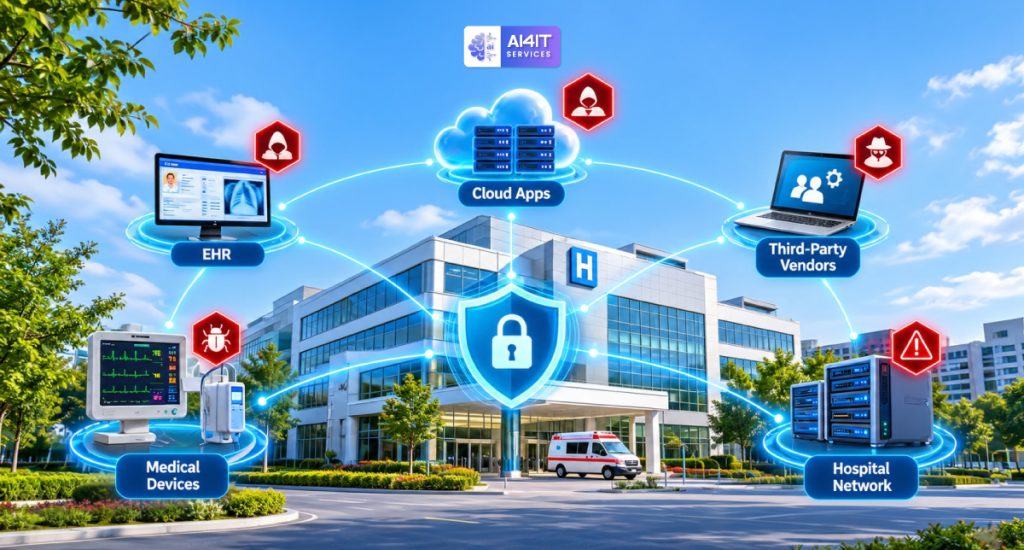
3. Connected Medical Devices Increase Security Complexity
Healthcare environments may contain connected imaging systems, patient monitors, infusion pumps, diagnostic equipment, and other network-enabled devices.
Some medical devices operate on older software or have limited patching options. Others may depend on specialized vendor support.
Organizations need visibility into these devices and should understand how they communicate with clinical and administrative networks.
4. Third-Party Technology Creates Additional Risk
Healthcare organizations depend on EHR vendors, cloud providers, billing services, laboratories, medical equipment suppliers, and IT service providers.
If a third-party organization experiences a security incident, patient information or healthcare operations may also be affected.
Vendor security reviews and clear contractual responsibilities are essential.
1. Understand HIPAA Cybersecurity Requirements
HIPAA is one of the most important regulatory considerations for healthcare cybersecurity in the United States.
The HIPAA Security Rule establishes national standards to protect electronic protected health information (ePHI) created, received, maintained, or transmitted by covered entities and their business associates.
The Security Rule requires appropriate administrative, physical, and technical safeguards to protect the confidentiality, integrity, and availability of ePHI.
Who Needs to Consider HIPAA Security?
HIPAA requirements generally apply to:
- Health plans
- Healthcare clearinghouses
- Healthcare providers that conduct certain electronic transactions
- Business associates that create, receive, maintain, or transmit ePHI on behalf of covered entities
Examples of organizations that may need to evaluate their HIPAA obligations include hospitals, medical practices, healthcare billing companies, laboratories, and healthcare technology service providers.
Whether a particular organization or vendor is covered depends on its activities and relationships under HIPAA.
The Three Categories of HIPAA Security Safeguards
| Safeguard category | Purpose | Examples |
| Administrative safeguards | Establish security policies and organizational responsibilities | Risk analysis, workforce training, security procedures |
| Physical safeguards | Protect facilities and physical systems | Facility access controls, workstation security, device controls |
| Technical safeguards | Protect electronic health information through technology | Access controls, audit controls, authentication, transmission security |
These safeguards work together to protect ePHI.
Important HIPAA Security Rule Update for 2026
HHS published a proposed HIPAA Security Rule update on January 6, 2025, intended to strengthen cybersecurity protections for electronic protected health information.
The proposal includes measures addressing areas such as:
- More detailed risk management practices
- Stronger technical safeguards
- Asset inventories and network mapping
- Encryption
- Multi-factor authentication
- Security testing
- Backup and recovery
- Incident response planning
- Business associate and vendor security
Important: These are proposed changes, not automatically binding requirements under a finalized rule. Healthcare organizations should distinguish between the HIPAA Security Rule currently in effect and proposed amendments.
The existing Security Rule continues to require appropriate safeguards and risk analysis. Organizations should monitor HHS updates and consult qualified compliance professionals about their obligations.
Useful official references:
2. Identify the Biggest Cybersecurity Threats Facing Healthcare Organizations
Understanding the threats affecting healthcare environments is the first step toward reducing risk.
Threat 1: Ransomware Attacks
Ransomware can make electronic health records, file servers, and business applications unavailable.
Potential consequences include:
- Disrupted clinical operations
- Delayed appointments and procedures
- Inaccessible patient information
- Interrupted billing and administrative activities
- Exposure of sensitive data
- Expensive system recovery
Recommended protection:
- Maintain secure and tested backups.
- Enable multi-factor authentication.
- Segment critical networks.
- Patch vulnerable systems.
- Monitor unusual network activity.
- Establish an incident response plan.
Threat 2: Phishing and Social Engineering
Healthcare employees regularly receive emails, messages, and requests involving patients, insurance companies, suppliers, and other medical professionals.
Attackers may impersonate trusted organizations to trick employees into revealing credentials or opening malicious attachments.
Phishing can lead to compromised email accounts, unauthorized access, malware infections, and data theft.
Recommended protection:
- Deploy email security and phishing protection.
- Train employees to recognize suspicious requests.
- Enable MFA.
- Use secure email authentication configurations.
- Provide an easy process for reporting suspicious messages.
Threat 3: Stolen Credentials and Unauthorized Access
Compromised usernames and passwords can allow attackers to access patient records, email accounts, and administrative systems.
Shared accounts and excessive permissions make it harder to identify who accessed information.
Recommended protection:
- Assign unique user accounts.
- Require MFA for sensitive systems.
- Apply role-based access control.
- Remove access when employees leave.
- Review privileged accounts regularly.
- Monitor unusual login activity.
Threat 4: Insider Threats
Not every security incident originates outside an organization.
Employees, contractors, or other authorized users may accidentally or intentionally expose sensitive information.
Examples include:
- Sending patient records to the wrong recipient
- Accessing records without a legitimate business reason
- Sharing passwords
- Downloading sensitive data to personal devices
- Leaving unlocked workstations unattended
Recommended protection:
Use access restrictions, audit logging, workforce training, documented procedures, and appropriate monitoring.
Threat 5: Medical Device Vulnerabilities
Connected medical equipment introduces technical and operational challenges.
Devices may run outdated operating systems, use unsupported software, or require specialized maintenance from manufacturers.
Applying an ordinary software patch may not be practical if it could affect device certification, clinical functionality, or vendor support.
Recommended protection:
- Maintain a medical-device inventory.
- Identify unsupported devices.
- Segment medical devices from general office networks.
- Restrict unnecessary network access.
- Coordinate security updates with manufacturers.
- Monitor network communication.
- Establish compensating controls where patching is not possible.
Threat 6: Third-Party and Supply Chain Attacks
Healthcare organizations frequently depend on external providers for IT support, cloud infrastructure, EHR systems, billing, and other services.
A vendor compromise can create indirect exposure for healthcare organizations.
Recommended protection:
- Evaluate vendor cybersecurity practices.
- Maintain a third-party inventory.
- Review business associate agreements where applicable.
- Restrict vendor access.
- Require MFA for remote support.
- Monitor third-party accounts.
- Establish security incident notification procedures.
3. Protect Electronic Health Records and Patient Information
Electronic health records are among the most important systems in a healthcare organization.
They may contain medical histories, diagnoses, prescriptions, laboratory results, insurance details, and other sensitive patient information.
Protecting EHR systems requires a combination of technical controls, access management, monitoring, and employee awareness.
Essential EHR Security Controls
Role-based access control
Employees should access only the patient information necessary for their responsibilities.
For example, billing employees may need access to billing information, while clinical professionals may require access to patient treatment records.
Multi-factor authentication
Require additional verification when users access EHR systems, remote access services, administrative portals, and other sensitive applications.
Encryption
Use appropriate encryption to protect sensitive information at rest and during transmission.
Audit logging
Maintain logs that help identify who accessed patient information, when access occurred, and what activity was performed.
Session management
Use secure authentication sessions, automatic workstation locking, and appropriate session timeouts.
Secure data sharing
Use approved secure methods when exchanging patient information with other healthcare providers, laboratories, insurance companies, and business partners.
Regular access reviews
Review employee and contractor permissions to identify outdated or unnecessary access.
4. Secure Medical Devices and Healthcare Networks
Modern healthcare environments contain many connected systems that support diagnosis, monitoring, treatment, and administration.
These systems may operate on different operating systems, use specialized communication protocols, and have different security requirements.
A single flat network can increase the impact of a compromised device.
Why Network Segmentation Matters
Network segmentation separates systems into controlled network zones.
For example, a healthcare organization might separate:
- Medical devices
- Clinical workstations
- Administrative computers
- EHR infrastructure
- Guest Wi-Fi
- Backup infrastructure
- Server management systems
This helps restrict unnecessary communication between devices and limits the ability of an attacker to move from one compromised system to another.
Medical Device Security Checklist
| Security area | Recommended action |
| Asset inventory | Record device type, owner, location, and software version |
| Network isolation | Separate medical devices where appropriate |
| Access control | Restrict access to authorized personnel |
| Patch management | Coordinate updates with device manufacturers |
| Monitoring | Review unusual device communication |
| Vendor access | Secure remote maintenance connections |
| Incident planning | Document how clinical operations continue if devices become unavailable |
Medical-device security should involve IT, clinical engineering, clinical leadership, and device manufacturers.
Security changes must be planned carefully to avoid affecting patient care or device functionality.
5. Strengthen Identity and Access Management
Healthcare organizations may have hundreds or thousands of users accessing different systems.
These users may include doctors, nurses, administrators, contractors, IT employees, and external service providers.
Managing access consistently is a major cybersecurity requirement.
Best Practices for Healthcare Identity Security
Implement MFA
Use MFA for remote access, email, EHR platforms, administrative accounts, and cloud services.
Use unique accounts
Avoid shared accounts wherever individual accountability is required.
Apply least privilege
Grant only the permissions needed for each role.
Separate administrative accounts
Use separate privileged accounts for system administration rather than everyday email and browsing activities.
Review access regularly
Remove unnecessary access when employees change roles or leave the organization.
Monitor suspicious authentication
Investigate unusual login locations, repeated failed login attempts, and unexpected access patterns.
Secure third-party access
Require strong authentication, approved access windows, and appropriate monitoring for vendors and contractors.
6. Protect Healthcare Organizations Against Ransomware
Ransomware protection should be a core part of every healthcare cybersecurity program.
A ransomware incident can interrupt access to patient records, medical scheduling systems, imaging applications, file servers, and other critical services.
Healthcare organizations need a strategy that covers prevention, detection, containment, and recovery.
Build a 3-2-1 Backup Strategy
The 3-2-1 backup approach provides a practical foundation:
- Maintain three copies of important data.
- Use two different storage types where practical.
- Keep at least one copy off-site.
For stronger ransomware protection, consider immutable or offline backup copies.
Additional Ransomware Protection Measures
- Protect backup administrator accounts.
- Enable MFA for backup management.
- Restrict backup deletion permissions.
- Separate backup infrastructure from production networks.
- Monitor backup activity.
- Test file and application restoration.
- Maintain documented recovery procedures.
- Conduct incident response exercises.
Prioritize Critical Healthcare Systems
Not every system has the same recovery priority.
| System | Business importance | Recovery planning |
| EHR platform | Critical | Priority restoration |
| Patient monitoring systems | Critical | Clinical continuity procedures |
| Imaging and diagnostic systems | High | Tested recovery plan |
| Pharmacy systems | High | Documented operational alternatives |
| Billing and administration | Medium to high | Controlled restoration |
| General office systems | Varies | Recovery based on business impact |
These priorities should be determined through a formal business impact analysis involving clinical and operational leadership.
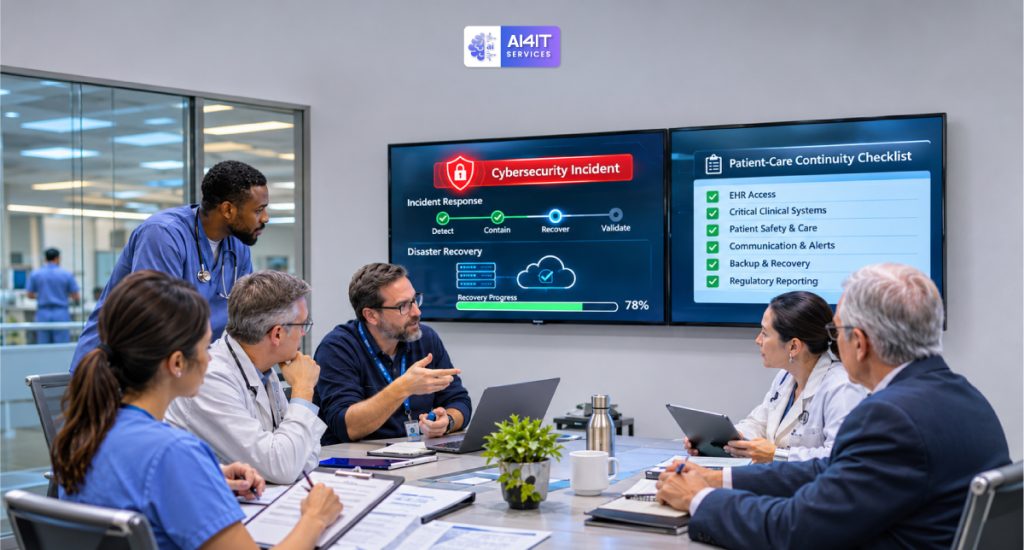
7. Build a Healthcare Incident Response and Business Continuity Plan
A healthcare cybersecurity incident may affect patient care, internal communication, medical equipment, and administrative services simultaneously.
Organizations should have an incident response plan that clearly defines what employees and technical teams must do.
What Should an Incident Response Plan Include?
1. Detection and reporting
Define how employees report suspicious activity, lost devices, unauthorized access, and suspected security incidents.
2. Containment
Establish procedures to isolate affected systems, disable compromised accounts, and reduce the possibility of further spread.
3. Investigation
Determine which systems, users, and patient information may have been affected.
4. Communication
Identify the internal response team, executive decision-makers, legal contacts, IT partners, and relevant external contacts.
5. Recovery
Restore clean systems and validate the security of the environment before returning services to normal operations.
6. Documentation
Maintain records of the incident, decisions, actions, and recovery activities.
Business Continuity for Patient Care
Technology recovery is only part of the response.
Healthcare organizations should also prepare for situations where electronic systems are temporarily unavailable.
Continuity procedures may include:
- Approved downtime documentation processes
- Alternative patient scheduling procedures
- Emergency communication methods
- Manual clinical documentation processes
- Procedures for accessing critical patient information
- Alternative prescription and referral workflows
- Contact lists for critical suppliers and technology providers
Clinical leadership should approve downtime procedures and ensure staff understand how to use them.
8. Manage Third-Party Risk and Business Associate Security
Healthcare organizations rarely operate independently.
They may rely on external providers for:
- Electronic health record platforms
- Cloud hosting
- IT support and managed services
- Medical billing
- Laboratory services
- Medical imaging
- Telehealth platforms
- Data storage
- Patient communication systems
If these providers handle protected health information on behalf of a covered entity, they may qualify as business associates under HIPAA.
What Is a Business Associate Agreement?
A Business Associate Agreement (BAA) is a written agreement that establishes required safeguards and responsibilities when a business associate handles protected health information on behalf of a covered entity.
Healthcare organizations should review whether BAAs are required for their vendor relationships and ensure agreements address applicable HIPAA obligations.
Third-Party Security Checklist
| Area | What to review |
| Vendor inventory | Identify providers that access or process sensitive information |
| Security controls | Review access management, encryption, and monitoring |
| Business associate agreements | Confirm required agreements are in place |
| Remote access | Restrict and monitor vendor connections |
| Incident reporting | Establish clear notification procedures |
| Subcontractors | Understand relevant downstream access and responsibilities |
| Recovery | Review vendor backup and business continuity capabilities |
Do not assume that a vendor is secure simply because it provides services to the healthcare industry.
Healthcare organizations remain responsible for managing their own HIPAA obligations.
9. Cloud Security in Healthcare: Protecting Data Across Digital Platforms
Cloud services help healthcare organizations support electronic records, telehealth, collaboration, storage, and remote access.
However, cloud adoption introduces security responsibilities that need to be clearly defined.
A secure cloud environment should include:
- Strong identity and access management
- MFA
- Encryption
- Secure network configurations
- Logging and monitoring
- Backup and recovery
- Data retention controls
- Vendor security reviews
- Appropriate contractual arrangements
Shared Responsibility in Cloud Security
Cloud providers secure aspects of their underlying infrastructure, while customers remain responsible for many configuration, identity, data, and access decisions.
The exact responsibilities depend on the service model and agreement.
For example, using a cloud-hosted EHR system does not automatically mean that every user account, access permission, or data-sharing configuration is secure.
Healthcare organizations should understand which security controls they manage and which are handled by their service providers.
10. Employee Cybersecurity Awareness: Your First Line of Defense
Technology alone cannot prevent every cybersecurity incident.
Employees interact with patient records, email, medical applications, external vendors, and connected devices every day.
A single mistake can expose sensitive information or provide an attacker with access to business systems.
Important Healthcare Cybersecurity Training Topics
Employees should receive training on:
- Recognizing phishing emails
- Identifying suspicious links and attachments
- Protecting passwords
- Using MFA
- Handling patient information securely
- Avoiding unauthorized data sharing
- Securing mobile devices
- Reporting lost or stolen equipment
- Following approved remote work procedures
- Reporting suspected cybersecurity incidents
Training should be practical and relevant to different job roles.
For example, clinical staff may need additional guidance on secure patient communication and workstation practices, while IT administrators need specialized training on privileged access and incident response.
Build a Security-Aware Healthcare Workplace
Consider implementing:
- Regular employee training
- Periodic phishing simulations
- Clear security policies
- Easy incident reporting
- New employee security onboarding
- Refresher training
- Role-specific security education
The objective is to make cybersecurity part of everyday healthcare operations rather than treating it as an occasional compliance exercise.
11. Healthcare Cybersecurity Risk Assessment: Know Where Your Organization Is Exposed
A cybersecurity risk assessment helps organizations identify vulnerabilities, evaluate potential threats, and determine which safeguards need improvement.
Under the HIPAA Security Rule currently in effect, regulated entities must conduct an accurate and thorough assessment of potential risks and vulnerabilities to the confidentiality, integrity, and availability of ePHI.
This should not be treated as a one-time paperwork exercise.
Risk analysis should consider the organization’s actual environment, including:
- Electronic health record systems
- Servers and workstations
- Cloud applications
- Medical devices
- Remote access
- Employee accounts
- Backup infrastructure
- Third-party service providers
- Data storage and transmission
- Physical access to systems
Key Areas to Evaluate
| Assessment area | Questions to ask |
| Patient data | Where is ePHI stored, accessed, and transmitted? |
| Identity security | Are MFA and role-based access controls enabled? |
| Network security | Are clinical and administrative systems appropriately separated? |
| Endpoint protection | Are devices monitored and updated? |
| Backup protection | Are recovery copies secure and tested? |
| Third-party access | Do vendors have appropriate security controls? |
| Incident response | Are responsibilities and procedures documented? |
| Employee training | Can staff recognize and report threats? |
Use Official HHS Resources
HHS provides cybersecurity resources to help healthcare organizations strengthen security practices.
Two useful resources include:
- HHS Cybersecurity Performance Goals — voluntary, healthcare-specific practices designed to help organizations prioritize high-impact cybersecurity improvements.
- HHS HIPAA Security Risk Analysis Guidance — guidance on assessing risks and vulnerabilities affecting ePHI.
Check Your Cybersecurity Risk Score
Do you know where your healthcare organization may have cybersecurity weaknesses?
Use the AI4IT Services Cybersecurity Risk Score assessment to review potential risk areas and identify where additional security improvements may be needed.
Start your assessment:
https://calculator.ai4itservices.com/cybersec
12. A Practical 90-Day Healthcare Cybersecurity Improvement Plan
Healthcare organizations do not need to implement every security improvement at once.
A phased approach helps prioritize important controls while keeping clinical and administrative operations running.
Days 1–30: Assess and Identify
- Inventory servers, workstations, medical devices, and cloud services.
- Identify where electronic patient information is stored.
- Review user accounts and administrator access.
- Assess MFA coverage.
- Review existing backup arrangements.
- Identify unsupported systems and devices.
- Review third-party access.
- Document major cybersecurity risks.
Days 31–60: Strengthen Security
- Improve identity and access management.
- Enable MFA across critical systems.
- Review endpoint security and patch management.
- Strengthen email security.
- Segment medical and administrative networks where appropriate.
- Review backup isolation and retention.
- Confirm required vendor agreements.
- Update incident response procedures.
Days 61–90: Test and Improve
- Test file and application restoration.
- Conduct a ransomware tabletop exercise.
- Review incident reporting procedures.
- Validate clinical downtime workflows.
- Review privileged access.
- Test network monitoring and alert escalation.
- Update security documentation.
- Establish a recurring risk review schedule.
At the end of 90 days, management should have a clearer view of its security posture, outstanding risks, and priorities for continued improvement.

13. How Managed IT Services Can Support Healthcare Cybersecurity
Many medical practices, clinics, and growing healthcare organizations do not have large internal IT security teams.
Managing infrastructure, endpoint security, network protection, backup systems, and employee support can place considerable pressure on internal staff.
A managed IT services provider can help support these responsibilities, depending on the agreed service scope.
Healthcare IT Services May Include
- Server and infrastructure management
- Network monitoring
- Endpoint security management
- Patch management
- Firewall administration
- Cloud infrastructure support
- Backup monitoring
- Disaster recovery planning
- IT help desk support
- Security monitoring and escalation
- IT documentation and reporting
Some organizations may also need specialist managed detection and response (MDR), penetration testing, or dedicated incident response services.
These services should be evaluated separately rather than assumed to be included in a standard managed IT agreement.
Questions to Ask a Healthcare IT Provider
Before selecting a provider, consider asking:
- Do you have experience supporting healthcare environments?
- Can you support HIPAA-related security requirements?
- How do you manage access to systems containing ePHI?
- Do you provide endpoint and network monitoring?
- How are backups protected and tested?
- Can you support incident response planning?
- How do you manage third-party and remote access?
- What security responsibilities remain with our organization?
- Can you provide appropriate contractual documentation, including a BAA when required?
- How do you report security issues and service performance?
A qualified provider should clearly explain its responsibilities, technical capabilities, service-level commitments, and limitations.
Frequently Asked Questions (FAQs)
1. Why is cybersecurity important in healthcare?
Healthcare organizations manage sensitive patient information and depend on technology for clinical and administrative operations. Cybersecurity helps protect patient privacy, maintain data integrity, reduce operational disruption, and support patient safety.
2. What is HIPAA cybersecurity compliance?
HIPAA cybersecurity compliance involves implementing appropriate administrative, physical, and technical safeguards to protect electronic protected health information under the HIPAA Security Rule. Organizations must assess risks and implement reasonable and appropriate protections for their environments.
3. What is electronic protected health information (ePHI)?
ePHI is individually identifiable health information that is created, received, maintained, or transmitted electronically by a HIPAA-regulated entity or business associate.
4. What are the biggest cybersecurity threats facing healthcare organizations?
Common threats include ransomware, phishing, stolen credentials, unauthorized access, insider threats, medical-device vulnerabilities, and third-party security incidents.
5. How can hospitals and clinics protect patient data?
They can strengthen patient data protection through MFA, role-based access control, encryption, endpoint security, network segmentation, audit logging, employee training, secure backups, and regular risk assessments.
6. Are small medical practices required to follow HIPAA Security Rule requirements?
Healthcare providers that qualify as HIPAA covered entities must comply with applicable HIPAA requirements, regardless of their size. Business associates also have relevant obligations. The safeguards should be appropriate to the organization’s environment and risks.
7. Does HIPAA require multi-factor authentication?
The current HIPAA Security Rule does not establish MFA as a universal, specifically named requirement for every system. However, organizations must implement reasonable and appropriate safeguards based on their risk analysis. MFA is a strong security practice and is included in HHS’s proposed Security Rule changes.
8. What should a healthcare organization do after a ransomware attack?
Activate the incident response plan, contain affected systems, preserve evidence, engage appropriate technical and legal specialists, assess potential data exposure, validate backups, and restore systems in a controlled manner. Evaluate applicable breach notification and reporting obligations.
9. How often should healthcare organizations conduct cybersecurity risk assessments?
The HIPAA Security Rule does not prescribe one universal assessment frequency. Organizations should maintain an ongoing risk analysis and update it when changes in systems, threats, or operations make that necessary. Many organizations also establish scheduled reviews as part of their security program.
10. Can managed IT services help healthcare organizations improve cybersecurity?
Yes. Depending on the agreement, managed IT providers can support infrastructure management, patching, endpoint security, backup monitoring, network protection, and IT support. Healthcare organizations must still understand their own HIPAA responsibilities and verify the provider’s capabilities and contractual obligations.
11. What is the difference between HIPAA compliance and cybersecurity?
HIPAA compliance is a regulatory obligation involving privacy, security, and breach notification requirements. Cybersecurity is the broader practice of protecting systems, networks, devices, and information from threats. Strong cybersecurity supports HIPAA compliance, but installing security tools alone does not establish compliance.
Final Thoughts: Protect Patient Data by Making Cybersecurity a Priority
Healthcare cybersecurity is no longer simply an IT department responsibility. It is an essential part of protecting patients, supporting clinical services, and maintaining trust.
In 2026, healthcare organizations need to address ransomware, identity security, medical-device vulnerabilities, third-party access, cloud security, and operational recovery as connected parts of one security strategy.
The most important steps are:
- Understand your HIPAA Security Rule responsibilities.
- Identify where patient information is stored and accessed.
- Strengthen MFA and privileged access controls.
- Secure EHR systems and connected medical devices.
- Protect backups against ransomware.
- Review vendor and business associate security.
- Train employees to recognize cybersecurity threats.
- Maintain incident response and clinical downtime procedures.
- Conduct regular risk analysis and test recovery capabilities.
No single cybersecurity product can eliminate every risk. A combination of appropriate technology, documented processes, trained employees, and continuous risk management provides a stronger foundation.
Need help strengthening your healthcare IT security?
AI4IT Services helps businesses evaluate IT infrastructure, cybersecurity requirements, server environments, and technology operations.
Whether your organization needs support with IT infrastructure, network security, endpoint protection, backup planning, or ongoing IT management, a structured assessment can help identify opportunities to improve your security posture.
Book a consultation with AI4IT Services:
https://go.appointmentcore.com/book/yYDD8Arcz?cid=is:~Contact.Id~
Website: https://www.ai4itservices.com/