
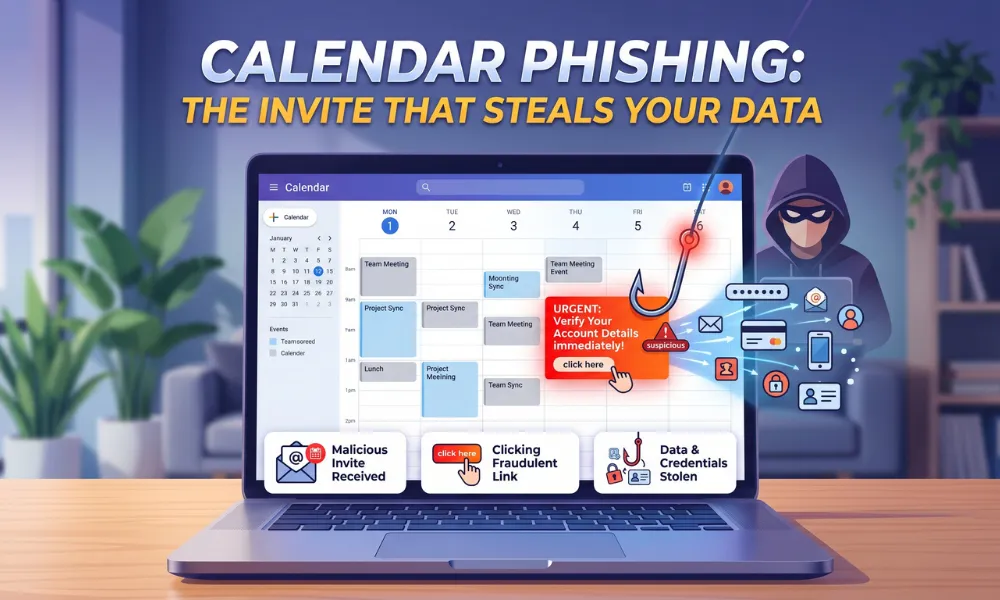
Most people accept calendar invites without a second thought. It looks routine, it feels urgent, and clicking takes less than a second. Cybercriminals have turned that habit into a weapon. Calendar phishing is an attack where hackers send fake calendar invites carrying malicious links, QR codes, or credential-harvesting pages.
According to Cofense’s Phishing Defense Center, these attacks spiked sharply through 2024 and continue growing in 2025. Attackers specifically target corporate environments because calendar tools are deeply trusted there. What happens when the invite looks real, the sender looks familiar, and the meeting feels completely routine?
What Calendar Phishing Actually Means
Calendar phishing uses .ics files, the universal calendar format, as the attack weapon. These files arrive via email and get silently added to the target’s calendar. No acceptance click is required in many environments.
The event sits there, waiting. It carries a malicious link inside the location field, agenda, or attached file. When the target clicks in to “join the meeting,” the trap activates. The attack hides in plain sight by mimicking something completely ordinary.
How the Attack Plays Out Step by Step
The attacker crafts a convincing invite from a spoofed sender address. Something like “Salary Review” or “IT Security Briefing” lands in the inbox. Microsoft 365 automatically adds the event to the calendar without user action.
Hours later, a reminder fires. The target clicks to join. A fake Microsoft or Google login page steals their credentials instantly. Even after reporting the email, the calendar entry stays active and dangerous.
That persistence is exactly what makes calendar phishing so effective. Protecting the platforms hosting these tools matters enormously. Organizations should invest in Cloud Infrastructure Services that build security into the environment from the ground up.
Why Email Security Tools Keep Missing This Threat
Most secure email gateways were built to scan email bodies and attachments. Calendar invite data lives in a completely different layer. Standard filters simply don’t inspect the .ics file content the same way.
Malicious links inside a calendar phishing invite never appear in the email body. URL-scanning tools integrated at the email layer never even see them. Attackers know this blind spot exists and deliberately exploit it.
Many IT teams assume strong email security covers calendar risk. That assumption is dangerously wrong.
Common Disguises Used in Calendar Phishing Attacks
Attackers pick lures that match what employees expect to see every week. The most frequently spotted themes across active calendar phishing campaigns include:
- Urgent HR meetings around salary reviews or policy updates
- Fake IT security briefings with “immediate action required” language
- Spoofed executive calls or leadership roundtables
- Vendor onboarding sessions with embedded document links
- Deadline-driven invites using words like “Final Notice” or “Overdue.”
The visual design closely mirrors genuine Outlook and Google Calendar notifications. Familiar colors and button styles make clicking feel automatic rather than suspicious.
How Organizations Can Close the Gap
IT admins in Microsoft 365 can disable automatic calendar processing using PowerShell. This stops .ics files from silently planting events without user acknowledgment.
Mail flow rules can also quarantine external .ics attachments from unknown senders. Microsoft’s “Hard Delete” remediation action removes both the email and the associated calendar entry simultaneously.
Most security teams don’t use it consistently, leaving events active long after the email disappears. No single control eliminates calendar phishing. Layered defenses, combined with awareness, create the most resilient posture.
Organizations tackling this threat seriously should engage Advanced Cybersecurity Services built for modern collaboration environments.
What People Inside Organizations Should Do
Pause before interacting with any unexpected calendar invite. Check the sender’s actual email domain, not just the display name. A single altered character like “Micr0soft” instead of “Microsoft” reveals the deception.
Verify through a separate channel before clicking anything. Report the suspicious email first, then delete the calendar entry manually. Reporting the email alone does not remove the calendar event. Treat every link inside a calendar invite with the same skepticism as a link in an unknown email.
Why Automation Catches What Humans Miss
Even well-trained teams can’t manually review every calendar activity at scale. Automated monitoring flags anomalous patterns like external domains creating events or unusual link structures inside .ics files.
Real-time alerts mean security teams can respond before damage spreads. Intelligent automation also correlates signals across email, calendar, and collaboration platforms.
A calendar phishing attack that bypasses email filters may still trigger behavioral anomalies that automated tools catch. Extending detection into collaboration environments through AI Automation in IT Operations significantly reduces dwell time and response lag.
FAQs
What makes calendar phishing different from regular phishing?
The attack plants itself directly on the calendar, surviving even after the email is deleted. That persistence gives attackers a second opportunity to compromise the target.
Can calendar phishing happen on mobile devices?
Yes, mobile calendar apps are equally vulnerable. Smaller screens make it harder to inspect sender addresses and embedded links carefully.
Does accepting a calendar invite automatically compromise a device?
Accepting the invite alone does not cause harm. The danger comes from clicking links or opening attachments inside the event.
How do attackers get email addresses for these campaigns?
Attackers source addresses from data breaches, LinkedIn scraping, and public company directories. Targeted campaigns often follow careful reconnaissance of specific organizations.
What should happen if a suspicious invite is already accepted?
Avoid clicking anything inside the event, report the email immediately, and delete the calendar entry. Escalate to IT if any links were already clicked.
Is Google Calendar safer than Outlook against these attacks?
Both platforms have been actively exploited in calendar phishing campaigns. Security posture depends on configuration and user awareness, not the platform itself.
Can standard email security tools detect calendar phishing?
Most traditional tools miss it because malicious content hides inside calendar data rather than the email body. Advanced threat detection covering collaboration tools offers far stronger protection.