

Buying computers for a business seems straightforward until it is not. Many organizations grab whatever fits the budget, assuming a laptop is a laptop. That assumption gets expensive.
Businesses running consumer hardware report up to 23% more unplanned downtime compared to those on business-grade machines, and lost hours in a professional environment are never cheap.
The core issue with Business PCs vs Consumer PCs is not just price; it is what each machine is actually built to handle. Build quality, security, manageability, and long-term cost all sit on opposite ends of the spectrum.
None of that is obvious from a retail shelf where both machines can carry nearly identical spec labels. But crack open the chassis, and the story changes completely. What actually separates a machine that holds up for six years from one that starts causing problems at month eighteen?
What Actually Sets Business PCs Apart?
Manufacturers design consumer PCs around a retail price point from the start. Component quality, testing, and software configuration all adjust around that target number. Business-class PCs work in the opposite direction.
Engineers start with what a corporate environment demands, then work toward a price. That foundational design philosophy shapes every component inside the machine.
Pairing the right hardware with Managed IT Services ensures businesses get maximum performance from deployment through end-of-life.
Build Quality and Durability
Consumer PCs use plastic-heavy chassis and soldered RAM to meet lower price points. That approach works fine at home but breaks down fast under professional workloads. Business machines use reinforced alloy frames, better cooling systems, and tested components.
Spare parts for business lines stay available for five to seven years. Consumer model parts disappear from supply chains within 18 months of launch. When parts vanish, repairs become impossible and full replacement becomes the only option.
Security Hardware That Consumer PCs Simply Skip
This is where the Business PCs vs Consumer PCs gap becomes most consequential for organizations. Business machines ship with hardware-level security built directly into the chipset.
These include TPM 2.0 chips, smart card readers, IR cameras, and encrypted storage support. Consumer PCs occasionally include a basic TPM chip to satisfy Windows 11 requirements.
But they rarely push security features beyond that bare minimum. Businesses handling sensitive or regulated data should also explore Compliance & Governance strategies to align hardware choices with regulatory frameworks.
Total Cost of Ownership: The Real Story Behind the Price Tag
Many purchasing decisions stall at the upfront price comparison alone. A consumer PC typically costs $300 to $600 less than a comparable business model. Those savings look attractive on any budget sheet initially.
But total cost of ownership tells a very different story across three to five years. Consumer PCs carry one-year limited warranties with mail-in repair service. Business PCs ship with three-year next-business-day onsite support as a standard feature.
One avoided service call can easily offset that entire upfront price difference. Frequent replacement cycles on consumer hardware compound these costs significantly over time.
Remote Management and IT Support Compatibility
Modern IT environments rely heavily on centralized device management across the fleet. Tools like Microsoft Intune and SCCM work best with business-class hardware features.
Consumer PCs often lack the BIOS-level capabilities that enterprise remote administration actually depends on. That missing layer creates real friction for IT teams already stretched thin across hybrid and remote workforces.
Business machines support Intel vPro and enterprise endpoint platforms straight out of the box, which saves setup time and reduces compatibility headaches.
Teams that pair smart hardware with AI Automation in IT Operations cut down on manual oversight and start catching issues before those issues ever reach the end user.
Software and Bloatware
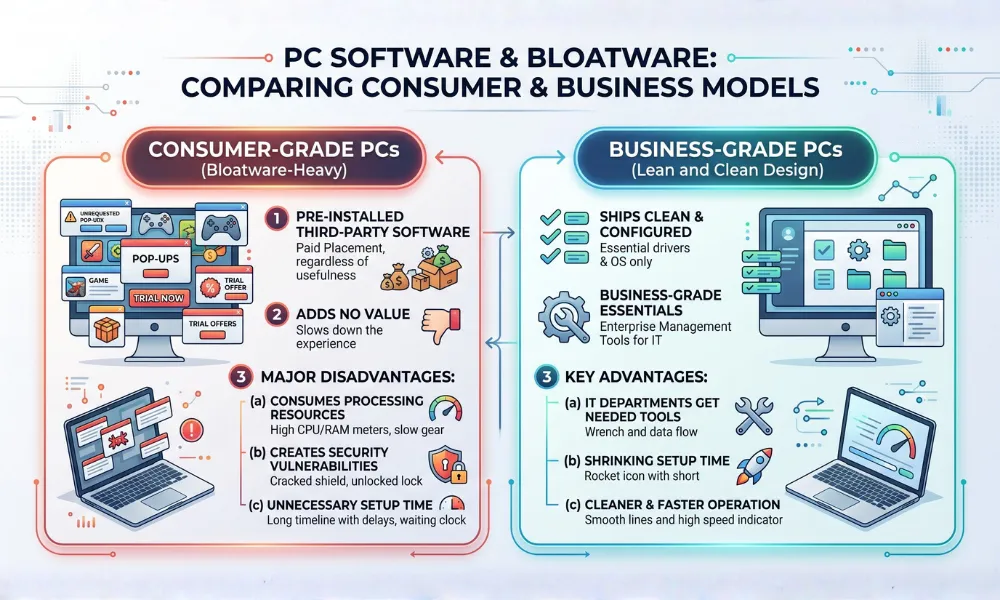
Consumer PCs ship loaded with pre-installed software from third-party vendors, paying for placement. Manufacturers get paid to bundle these apps regardless of their usefulness to the end user.
Bloatware consumes processing resources, creates security vulnerabilities, and adds unnecessary setup time. Business-grade PCs consistently ship lean and clean by design.
Pre-installed software includes only essential drivers, the operating system, and enterprise management tools. IT departments actually need those tools from day one.
Setup time shrinks considerably, and machines run cleaner without promotional clutter slowing everything down from the start.
When Does a Consumer PC Actually Make Sense?
Not every organization needs business-grade hardware across the entire device fleet. Small teams handling light document work or browsing may not justify that investment.
A temporary project workstation or short-term hire setup works reasonably well on consumer hardware. Creative professionals chasing raw GPU performance sometimes find consumer gaming laptops offer better specs per dollar spent.
However, any organization managing multiple devices, handling regulated data, or depending on remote IT support tips firmly toward business-grade machines. The management infrastructure around a business PC simply does not exist in a consumer product.
Business PC vs Consumer PC: Side-by-Side Comparison
| Feature | Business PC | Consumer PC |
| Build Quality | Reinforced alloy, MIL-SPEC tested | Plastic-heavy, retail-grade |
| Warranty | 3-year onsite (standard) | 1-year limited, mail-in |
| Security Hardware | TPM 2.0, smart card reader, IR camera | Basic TPM only |
| Bloatware | Minimal to none | Heavy pre-installed software |
| Remote Management | Intel vPro, full MDM support | Limited or no enterprise support |
| Parts Availability | 5 to 7 years | 12 to 18 months |
| Operating System | Windows 11 Pro | Windows 11 Home |
| Expected Lifespan | 5 to 7 years | 2 to 4 years |
| Upfront Cost | Higher by $300 to $600 | Lower |
| Total Cost Over 5 Years | Lower due to fewer replacements | Higher due to more frequent cycles |
Thinking about a hardware refresh or a full fleet evaluation? Our team at AI4IT Services helps businesses choose the right machines, manage deployments cleanly, and keep every device running without unnecessary downtime, dragging productivity down.
FAQs
Are business PCs always more expensive than consumer PCs?
Business PCs cost more upfront but deliver lower total ownership costs over time. Fewer repairs and replacements make up that difference fairly quickly.
Can a consumer PC run business software?
Most business applications run on consumer hardware without major compatibility issues. The real limitations show up in security features and remote manageability.
What is the main hardware difference between business and consumer PCs?
Business PCs include enterprise processors, TPM security chips, and stronger chassis materials by default. Consumer PCs prioritize lower production costs over those features.
Do business PCs come with Windows Pro by default?
Most business-class machines ship with Windows 11 Pro as the standard operating system. That version brings BitLocker, Group Policy, and Remote Desktop built right in.
How long do business PCs typically last compared to consumer PCs?
A well-maintained business PC comfortably runs for five to seven years without major issues. Consumer PCs usually start showing their age somewhere between the two and four-year mark.